

Key Takeaways
- Prime Day support pressure usually arrives after the order spike. Day one looks like revenue. Day two starts to show the queue: shipping questions, discount confusion, returns, claims, and product issues.
- The 2026 event leaves less room for operational waste. Earlier timing, more markets, and higher promotion costs make every avoidable return or delayed response more expensive.
- Traditional staffing does not scale cleanly for 26-market ecommerce events. Language coverage, time zones, and sudden contact volume create a throughput ceiling.
- HeroDash turns peak support into an elastic operating system. AI absorbs repeatable contacts, human agents handle judgment calls, and QA data keeps the operation stable while the event is live.

Prime Day 2026 Is Not Only an Ads Event
Most sellers prepare for Prime Day by thinking about inventory, discount thresholds, ad budgets, and deal placement.
That work matters. But it is not the whole margin story.
For 2026, Amazon says Prime Day will run from June 23 to June 26 in an initial group of markets. Across the full 2026 event calendar, Prime Day will cover 26 countries, with Australia, Brazil, India, and Japan scheduled later in the summer. That calendar shift pulls preparation forward. Freight, replenishment, deal approval, campaign setup, and staffing all have less slack than sellers are used to.
Fees and discount rules also make the event less forgiving. According to publicly available seller-facing summaries of 2026 Prime Day promotion changes, the US structure includes a $100 upfront fee per promotional deal plus a 1.5% event fee on sales, capped at $5,000. The exact economics vary by marketplace, deal type, product margin, and promotion strategy, but the direction is clear: the event is not just bigger. It is more expensive to participate in badly.
That changes how sellers should think about support. If a return, claim, or negative review was tolerable in a normal week, it becomes more expensive during a week where traffic was bought through inventory risk, ad spend, and promotion costs.
The Hidden Cost Appears on Day Two
The traffic is real. In 2025, Adobe Analytics reported that US online spending during the four-day Prime Day event reached $24.1 billion, up 30.3% year over year. That level of demand is why sellers keep preparing for Prime Day, even when margins are tighter.
The problem is that order volume and support volume do not peak at the same time.
Day one is mostly order intake. Customers see the deal, buy quickly, and move on. Day two begins the operational aftershock: “Where is my order?” “Why did the discount not apply?” “Can I change the address?” “When will this arrive?” “How do I return this?” “Is this product compatible with what I already own?”
For cross-border sellers, the queue becomes even less predictable. A US buyer may be asking about next-day delivery while a German buyer asks about VAT, a Mexican buyer asks about tracking language, and a French buyer asks for a return label. If the seller is active across 26 markets, the support day never really ends. It rolls from Europe into North America into Asia-Pacific and back again.
That is why Prime Day support should not be budgeted as “a few extra agents for a few extra tickets.” It should be treated as a post-purchase risk window.
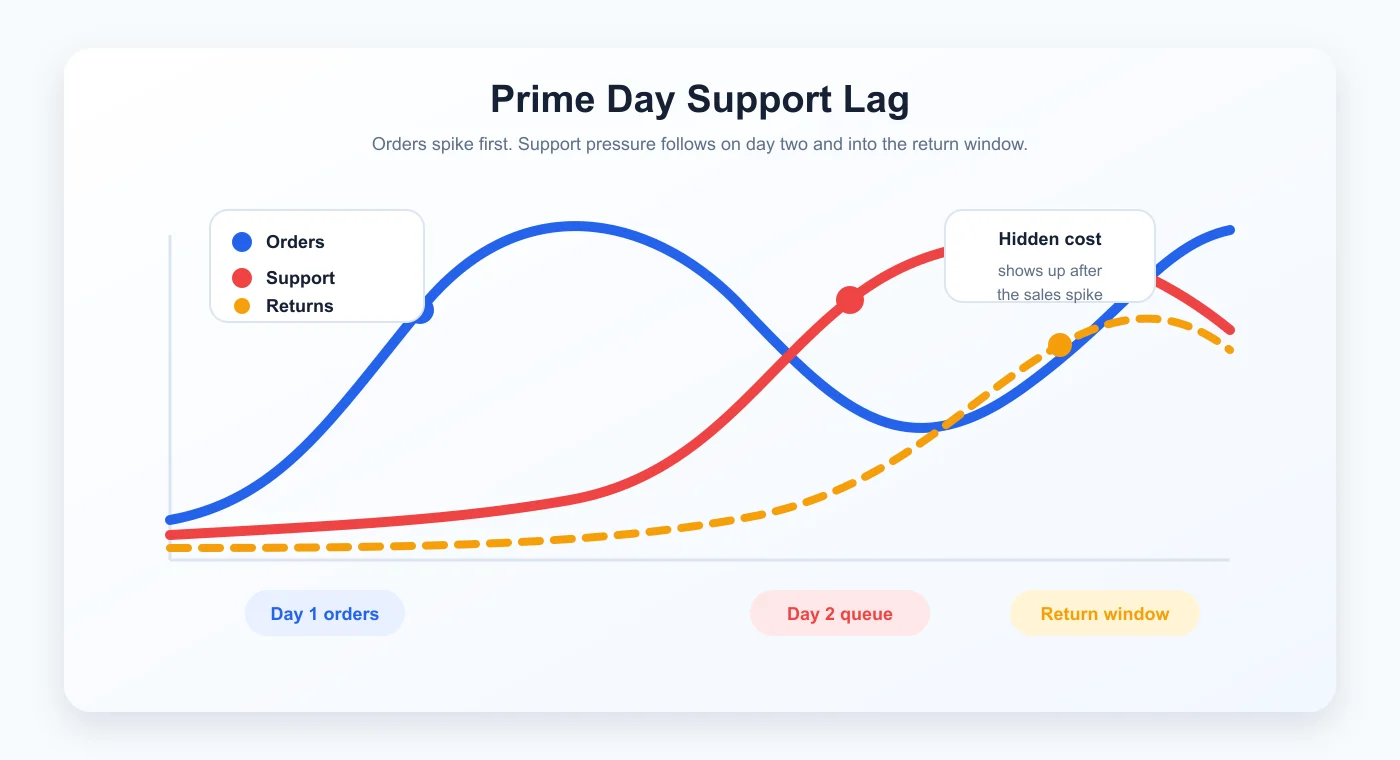
When response times stretch, buyers do not always wait. They open return requests, contact through multiple channels, leave public reviews, or file marketplace claims. The sales dashboard still looks strong, but the support queue quietly starts converting part of that revenue into cost.
This is the hidden cost of Prime Day. It does not show up on the fee invoice. It shows up later in returns, review quality, refund pressure, seller metrics, and support overtime.
Why Temporary Staffing Breaks Under Peak Pressure
The instinct is understandable: hire temporary agents before the event, train them quickly, and hope the queue holds.
Sometimes that helps. It rarely solves the real Prime Day problem.
Human throughput has a ceiling. An agent can handle only one customer conversation at a time. If contact volume jumps to 400% of normal, maintaining the same service level means either four times the coverage or a different operating model. For many sellers, four times the coverage is not practical for a narrow window that may last only a few days.
Language coverage is not the same as headcount. An English-speaking team may cover the US, UK, Canada, and Australia well enough. It cannot reliably handle German VAT questions, French return disputes, Polish customs delays, Spanish delivery issues, and Japanese product questions in the same 48-hour window. Prime Day turns multilingual support from a “nice to have” into a queue-control issue.
Peak demand ignores business hours. European buyers create volume during their daytime. North American buyers are active in the evening. Some buyers send messages after delivery attempts, which often happen outside the seller’s internal office rhythm. A fixed-shift support model creates gaps exactly when the queue is hottest.
Temporary agents need supervision. Prime Day is not the best time for weak product knowledge, inconsistent refund decisions, or agents who are still learning tone. A rushed hire can reduce backlog while increasing risk if quality monitoring is not live.
The result is familiar: the seller protects ad spend and inventory planning, but the post-purchase operation becomes the bottleneck.
What an Elastic Support Model Looks Like
An elastic support model does not mean removing humans. It means using humans where judgment matters and letting automation absorb the repeatable volume.
HeroDash is built around that split.
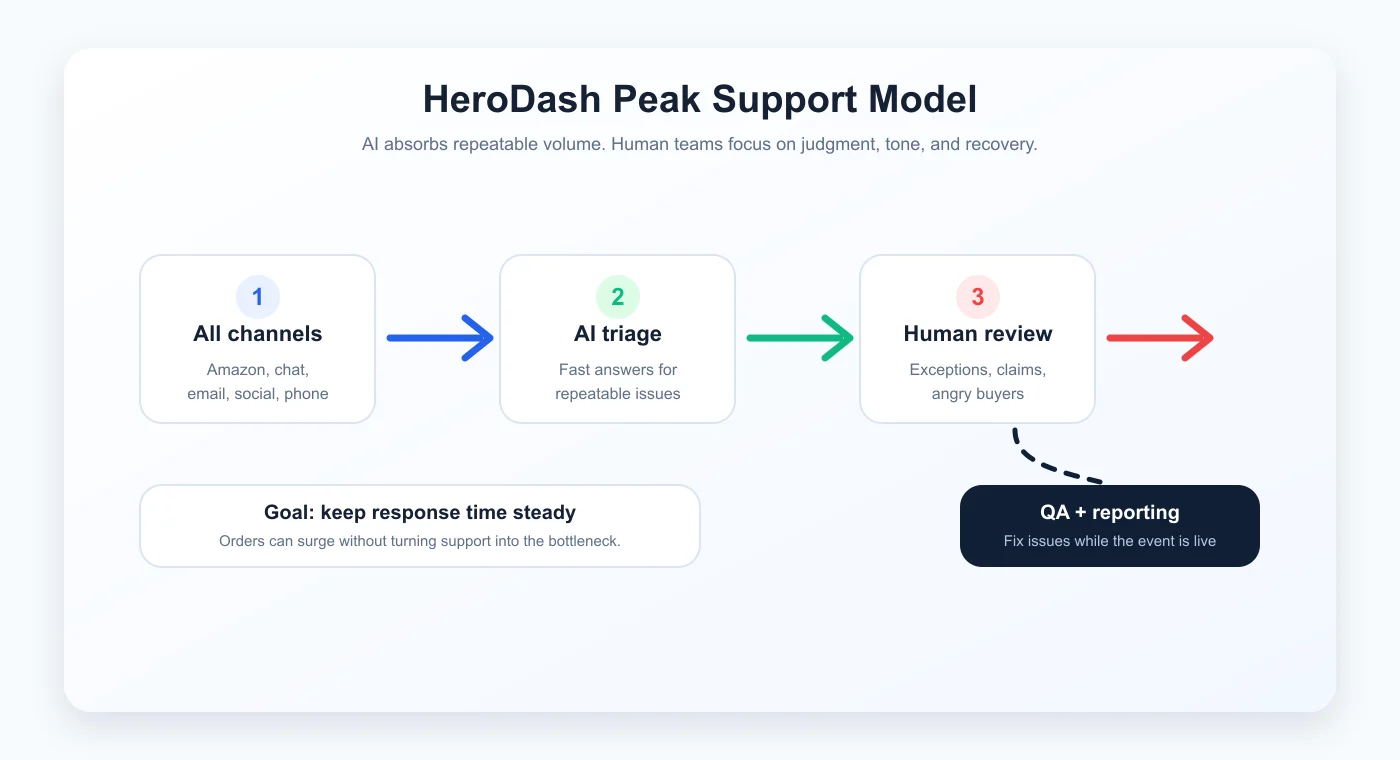
All channels, one workspace. During Prime Day, customers do not care which channel the seller prefers. They message through Amazon, email, live chat, WhatsApp, Facebook, Instagram, and phone. Some buyers repeat the same problem across several channels because they are anxious. HeroDash brings those contacts into a unified workspace so agents see context instead of fragments.
AI answers what does not need human judgment. Many contacts are predictable: tracking status, delivery timing, discount code questions, return initiation, product setup basics, and policy clarification. HeroDash can respond immediately in the buyer’s language, using the seller’s approved knowledge base and order context where integrated.
Human agents handle exceptions. A frustrated buyer, a damaged product, a marketplace claim, a high-value return, or a product-safety concern should not be trapped in a generic automation loop. Those contacts route to trained people with the context already attached.
QA runs while the event is still happening. Peak quality cannot wait for a post-event audit. HeroDash tracks response time, tone, escalation decisions, resolution accuracy, and outlier patterns so the team can correct problems before they become public reviews.
Reporting turns the spike into learning. Every contact can be tagged by channel, issue type, product, language, resolution path, and outcome. After the event, sellers can see what actually drove volume instead of guessing from scattered inboxes.
What to Answer Fast, and What to Escalate
| Prime Day contact | What the buyer needs fast | Best first response | Escalate when |
|---|---|---|---|
| Shipping status | Order status, carrier event, delivery estimate | Confirm the latest milestone and give a clear next expected update. | Tracking is stale, package is high value, or buyer is threatening a claim. |
| Discount confusion | Promo rule, order price, coupon status | Explain what applied at checkout and whether a price adjustment path exists. | Buyer alleges false advertising or marketplace policy is involved. |
| Return request | Return window, product condition rule, label status | Start the correct return path and explain timing in plain language. | Item is damaged, used, high value, or category-restricted. |
| Product question | SKU, variant, usage scenario, warranty boundary | Answer with product-specific context, not a generic FAQ. | Buyer may misuse the product or the answer affects safety or warranty. |
| Review-risk message | Sentiment, order history, prior contacts | Acknowledge frustration first, then solve or route quickly. | Buyer mentions reviews, claims, chargebacks, or repeated unresolved contacts. |
This table matters because a Prime Day queue is not one queue. It is many queues pretending to be one. The team should not treat a “Where is my order?” message the same way it treats a buyer threatening a claim or a buyer confused about product use.
The better the routing, the less the team wastes senior-agent time on repeatable questions.
Prime Day Is the First Peak, Not the Last
The support infrastructure built for Prime Day should not be packed away after June.
It should keep running through the post-event return window, Back to School, Prime Big Deal Days, Black Friday, Cyber Monday, holiday delivery deadlines, and the January return season. Sellers who treat every peak as a separate staffing emergency pay the setup cost again and again. Sellers who build elastic support infrastructure once can reuse it across the calendar.
Before the event
Update product knowledge, return rules, promotion rules, language coverage, escalation paths, and automation guardrails.
During the event
Track backlog age, channel mix, response time, repeat contacts, and review-risk messages in real time.
During the return window
Separate simple returns from damaged goods, policy disputes, high-value orders, and buyers who need recovery conversations.
After the event
Review which SKUs, regions, languages, and channels created the most cost, then update the next peak-season playbook.
For most ecommerce teams, the hard part is not knowing that support matters. The hard part is building a system that does not collapse exactly when the marketing campaign succeeds.
That is the Prime Day lesson. The order spike is only the first half of the event. The support queue decides whether those orders become retained customers.
What Sellers Should Measure After Prime Day
Ad dashboards tell you how the event performed before the customer asked for help. Support dashboards tell you whether the customer experience survived afterward.
After Prime Day, review:
- support volume by day, not only total ticket count;
- first response time by channel and language;
- backlog age during the 48-hour post-purchase window;
- return intent by SKU and product category;
- refund and replacement requests;
- review-risk contacts and sentiment trend;
- contacts handled by AI versus human agents;
- escalation accuracy and QA failures;
- repeat contact rate for the same order;
- the cost of avoidable returns compared with the cost of support coverage.
If a product sold well but generated a disproportionate share of support volume, that is not just a service issue. It is product-page feedback, packaging feedback, fulfillment feedback, and training feedback. HeroDash makes that pattern visible while the memory of the event is still fresh.
FAQ
Why does Prime Day create a support queue problem after the sales spike?
Prime Day creates a support queue problem because order volume rises first and support volume follows with a delay. Buyers purchase quickly during the promotion, then contact support about shipping status, missing discounts, returns, delivery timing, product questions, customs issues, or claims on day two and throughout the return window.
What support metrics should sellers monitor during Prime Day?
Sellers should monitor first response time, backlog age, channel mix, contact reason, language mix, return intent, escalation rate, refund requests, review-risk contacts, repeat contact rate, and product-level issue patterns. These metrics show whether the support operation is protecting or eroding peak-season margin.
Does AI replace human agents during Prime Day?
No. AI should absorb repeatable contacts such as tracking, return initiation, discount clarification, and basic product questions. Human agents should handle exceptions, frustrated buyers, high-value cases, claims, policy disputes, and customer recovery conversations.
How does HeroDash help during Prime Day?
HeroDash brings channels into one workspace, answers repeatable questions with AI in 65+ languages, routes exceptions to human agents, monitors QA in real time, and gives sellers structured reporting after the event. The goal is stable response quality even when order volume and support pressure spike.
Prepare your Prime Day support queue before day two arrives. Explore HeroDash, or see how Callnovo supports global ecommerce operations across languages, channels, and peak seasons.
Sources: Amazon announcement on Prime Day 2026 dates and participating countries; Adobe Analytics report on 2025 Prime Day online spending; cross-border seller summary of 2026 Prime Day fee and promotion changes.