

Customer Service Automation: Build a Reliable Workflow
Plan customer service automation around clear tasks, effective human review and verified outcomes. Compare full operating costs before expanding a pilot.
A customer asks for a replacement part. The chatbot understands the request, sends a reassuring reply and closes the conversation. The warehouse never receives an order. Your dashboard counts a completed interaction; the customer contacts support again.
Customer service automation is the use of software to carry out support tasks under defined rules, with people handling work that requires their judgment or authority. Choose a task with a verifiable result: a case assigned, a reply reviewed, or a permitted action recorded in the system that performs it.
This guide helps support managers choose those tasks, compare operating models and design a pilot they can evaluate. It covers email, chat and phone workflows, with checks for meaningful human review and a worked example of full operating cost.
Choose the task before the tool
Start with a repeated request whose inputs and completion conditions are clear. Keep the person who owns exceptions visible in the same plan. A task can be suitable for automation even when the surrounding customer relationship still needs a human.
| Customer need | Suitable first task | Evidence to inspect | Owner of exceptions |
|---|---|---|---|
| Find a published instruction | Retrieve the applicable article | Product version and source used | Knowledge owner |
| Reach the right team | Classify and route the request | Assigned queue and acceptance | Queue supervisor |
| Receive an update | Prepare an approved message | Correct recipient and send outcome | Case owner |
| Request a replacement | Collect details for review | Item, eligibility and decision record | Authorized service agent |
Choose one row for the first pilot. If a workflow requires access to a customer account, add identity checks before it retrieves protected information or makes changes. If the next step requires approval, make that approval part of the workflow.
Include cases that complicate the actual workload: an incomplete order number, a customer returning to an old thread, or a request in a different language. A demonstration built entirely around clean questions tells you little about the queue your team will operate.
What is being automated?
For a manager asking what is customer service automation, the practical answer includes both customer conversations and internal work. It may acknowledge an email, suggest a knowledge article, assign a ticket or remind a supervisor that a case needs attention. These activities require different permissions and produce different records.
IBM’s overview describes routine support tasks handled with limited or no human involvement and includes ticketing, notifications and initial responses. Its implementation guidance also calls for testing before launch and maintaining the process afterward. (IBM, n.d.)
A fixed rule is often enough when the condition is explicit. For example, a team might route messages addressed to a particular support alias into the appropriate queue. AI becomes useful when the input needs interpretation: identifying a topic in a customer’s description or preparing a draft based on approved material. The permission to interpret a request doesn’t automatically include permission to fulfill it.
An automated customer service setup can therefore combine rules, a knowledge base, an AI assistant and human agents. Map where each component starts and stops. The chatbot might collect details while an employee decides whether a replacement is appropriate. A workflow might notify a supervisor while the original agent remains responsible for the next customer update.
Keep a distinction between customer availability and staff availability. A chat window can receive requests outside business hours while the specialist team is offline. The acknowledgment should reflect the service arrangement you can actually deliver. Publishing an always-open channel without a defined follow-up process creates a growing queue of promises.
Separate answers, routing and actions
Divide automated customer support into layers so you can diagnose what failed. Each layer needs an input, a permitted output and an exception path. You can introduce automation in customer service gradually by enabling one layer while keeping the next under human control.
Answers depend on maintained knowledge
An answer workflow retrieves or generates information. Its source needs an owner who can correct outdated instructions, retire a product version and resolve conflicting guidance. A fluent reply based on the wrong warranty policy remains a bad reply.
Test questions whose answers depend on product variants or purchase conditions. Check whether the system requests missing information instead of guessing. Keep the source used with the review record so the knowledge owner can reproduce a problem. Reviewers should be able to distinguish a retrieval failure from an incorrect source document.
Language adds another check. In a BOTSLAB customer story, a German-speaking user communicated with a Chinese-speaking service representative through translation. That is a concrete way to support communication across languages. When applying that model, test whether part names, error messages and required actions retain their meaning. Translation assistance and a staffed native-language queue are different service arrangements.
Routing needs an accepting team
A routing workflow decides where work should go. Assignment alone doesn’t establish that the receiving team has the skill, capacity or authority to handle it. The receiving queue needs a way to identify unaccepted work and escalate it when the expected response window passes.
Carry the customer’s problem, relevant history and outstanding action into the handoff. A short summary helps the next agent orient themselves; access to the original conversation lets them check details. Avoid making the customer restate information simply because a channel or team changed.
IBM’s contact center automation guidance includes human handoff and ongoing monitoring among its implementation practices. Use those principles to define what the receiving team must see and who deals with a rejected transfer. (IBM, n.d.)
Actions need authority and a result
An action changes something outside the conversation: a record, an appointment or a fulfillment request. Define the allowed action and its limits before connecting the workflow to that system. A human approval should identify what was approved and which version of the request it covers.
For example, a proposed replacement workflow might collect the device model and damaged component, ask an authorized agent to review eligibility, then submit a request to fulfillment. That is an illustrative design, not a claim that a particular platform implements every step by default. The team must test its own integration and operating permissions.
If submission fails, the case needs a visible failure state and an owner. If the response times out, check whether the action occurred before retrying. Repeating an uncertain request can create duplicate work. The customer update should describe the result the team has confirmed.
Give each connected operation its own permission
Use a small permission table during setup. A read-only shipment lookup should have a different approval path from a refund, address change or replacement order.
| Task | Access to agree | Result to retain |
|---|---|---|
| Read a delivery status | Verified reference and permitted fields | Source status or lookup failure |
| Create a follow-up request | Permission to submit the required fields | Request identifier and receiving queue |
| Change a business record | Defined authority and any required approval | Approved change and confirmed system result |
This is an implementation checklist, not a promise that every integration supports all three operations. The ecommerce chatbot guide shows how to test these distinctions with order and return requests.
Check the quality of the human review
Give an approver the information needed to make a decision: the customer’s request, the applicable policy version, the proposed change and the record it affects. Keep the decision tied to those reviewed values. If the proposal changes, confirm whether a new review is required before anything is submitted.
In a CMSWire commentary on approval fatigue, Ricardo Saltz Gulko argues that speed pressure can weaken human oversight. He recommends examining review time, modifications and rejections, with independent re-review. Treat this as an operating concern to investigate, not a measured failure rate for your team. (CMSWire, 2026.)
| Review condition | Evidence to inspect |
|---|---|
| Reviewer edits a proposed field | The destination receives the edited value, with the decision linked to that version |
| Reviewer rejects the action | The action does not occur; the unresolved request has a next owner |
| An approved submission times out | The operator checks whether it already happened before retrying |
| The same request is submitted again | A duplicate is prevented or detected and assigned for correction |
These are suggested acceptance checks, not a claim that every platform supplies the required controls. Run them on a sandbox or designated test records. The chatbot launch checklist explains how to inspect these branches in the destination system.
Track review time alongside the proportion of proposals edited or rejected, then independently examine a sample of accepted decisions. A high approval rate can reflect good proposals or superficial review; the rate alone cannot tell you which. Inspect the underlying requests and decisions before changing the workflow. Set aside enough time for this work and agree who resolves disagreements between reviewers.
Review proposed knowledge before publishing it
When a conversation reveals a missing answer, retain the source question and propose a knowledge update for the responsible editor. Have that person check product applicability, conflicting instructions and private information before publication. Record which source changed so the team can repeat the affected tests.
Treat candidate knowledge and published guidance as separate states. An automated suggestion should not silently override an approved policy. Confirm the available review and publishing controls in the system you use; correcting a source and changing the bot’s operating permissions are separate tasks.
Prove that the next step actually happened
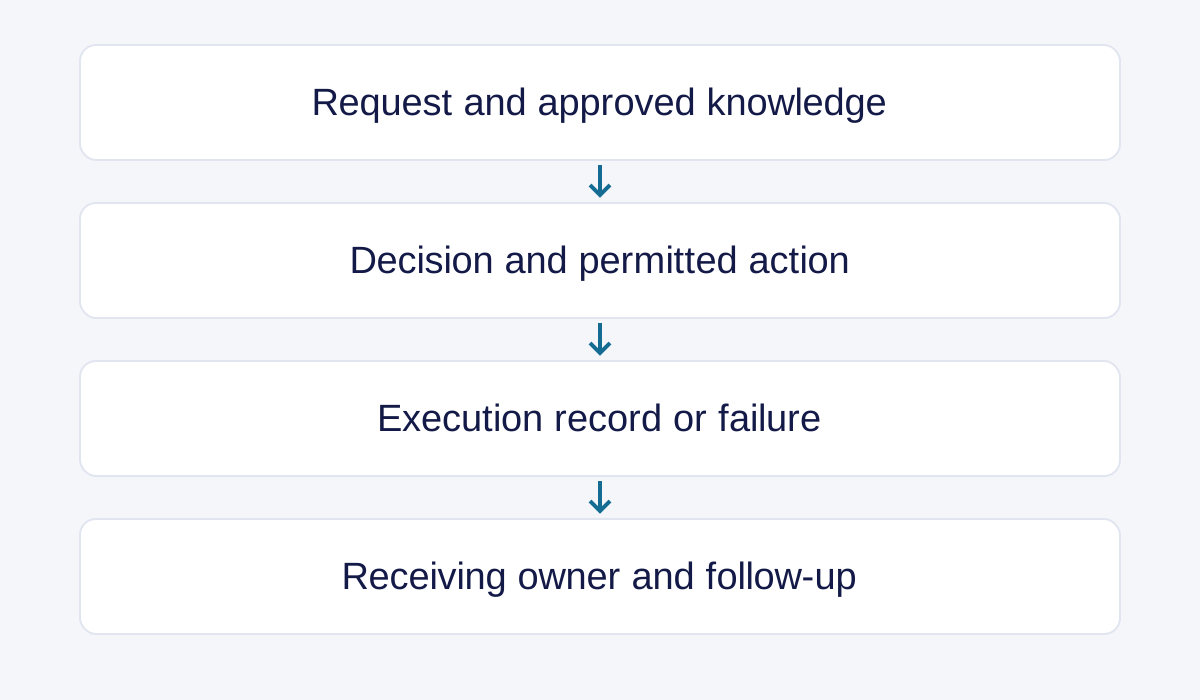
Measure customer support automation at the points where responsibility changes. A draft, an approval, an attempted action and a confirmed result are separate events. Recording each event makes it possible to find the actual delay and recover the case.
In a thank-you letter from an electronic-device brand, the described implementation included email grouping and knowledge-based handling of different message types. That mechanism helps organize incoming work. To evaluate a similar process in your operation, extend the test through assignment, response and exception handling. The letter doesn’t supply a measured delivery-success benchmark, so the evaluation must use your own pilot records.
A useful review record can remain compact:
| Field | What the reviewer checks |
|---|---|
| Customer request | The action or answer the customer actually needs |
| Source and input | Relevant policy, product details and conversation |
| Decision owner | The role authorized to approve an exception |
| Execution result | The record returned by the receiving system |
| Handoff outcome | The accepting person or team and next action |
| Customer follow-up | What was communicated, and whether the case returned |
For an email step, distinguish preparing a message, handing it to a sending service and knowing what happened afterward. Zendesk’s delivery-failure documentation explicitly limits visibility: it can confirm handoff for delivery, while final delivery to the recipient is outside its control and visibility. It also lists connector exceptions to its failure reporting. That limitation is a useful procurement question for any proposed email workflow.
Ask the supplier to demonstrate what happens after a failed send, an unavailable queue and an uncertain system response. The intended recovery should be clear enough for an operator to follow without reading the integration code. For more detail on ownership during escalation, use the AI escalation handling comparison.
Review the pilot by task and language rather than relying on one blended completion rate. Define resolution as completion of the agreed customer task, then keep unresolved and reopened cases visible. If a case closes after an acknowledgment and later returns for the original problem, the acknowledgment shouldn’t count as evidence that the problem was solved.
- Select a recurring task and document its current process.
- Define what qualifies as completion and what requires human review.
- Run representative requests and deliberately test exceptions.
- Compare the results with the records in the receiving systems.
- Fix recurring failures before extending the workflow to more tasks.
This sequence gives the team a practical release decision. It also helps separate a knowledge problem from a routing problem, which may require different people to fix.
Choose a setup your team can operate
Compare customer service automation solutions against the work and staffing model you have. A software purchase may provide routing and drafting tools while your team remains responsible for knowledge maintenance, staffing and customer decisions. A managed service changes who performs those duties, so the proposal needs to identify the owner of each one.
| Setup | Suitable starting point | Operating responsibility to clarify |
|---|---|---|
| Rules inside an existing help desk | Clear, repeated conditions | Who reviews rules and exceptions? |
| AI assistance for agents | Drafting and retrieval need human review | Who checks answers before sending? |
| Customer-facing AI with escalation | Bounded requests and a staffed fallback | Who accepts transfers and failed actions? |
| Software plus managed support | The business needs both tools and service capacity | Who maintains knowledge and approves changes? |
Callnovo.ai combines its HeroDash service platform with human support options. The useful discussion starts with the channels and tasks your team wants to cover. Bring an example request and follow it through to the person or system responsible for the final action.
Callnovo.ai provides human support in 65+ languages. A project still needs an agreed language mix, service schedule and escalation arrangement. Use actual customer messages when assessing language requirements, including the vocabulary needed for troubleshooting and policy explanations.
The advantages of automated customer service should be evaluated against a clear baseline. Faster acknowledgment, less manual sorting and more consistent access to approved knowledge are different benefits. Record which benefit the pilot is intended to produce, and inspect the corresponding evidence. Customer satisfaction feedback and repeat contacts can reveal problems that a speed metric misses.
Compare the complete operating cost: software, implementation, human review, maintenance and exception handling. Check the published pricing scope before requesting a proposal for your workflow. A quote based on one billing unit can’t be compared directly with a quote based on another without defining the workload and what each covers.
Calculate cost against the same completed task
In a Relación Cliente interview, Consulting C3 operations director Patricia Guerrero separates implementation cost from recurring operation and wider effects on the team. She also notes that when automation absorbs simpler contacts, the remaining human work can be more complex. This is a planning argument from an interview, not a published savings study. (Relación Cliente, 2026.)
Choose a comparison period and match the task mix, channels, languages and definition of completion. Include software and usage charges, integration, human review, exception handling, knowledge maintenance and repeat work. Allocate one-time setup costs over a stated evaluation horizon, keeping the actual cash outlay visible separately. Avoid counting the same employee time under both frontline handling and review.
The following USD figures are entirely illustrative. Each column represents a cohort of 1,000 unique requests with the same assumed task mix and observation window. They are not Callnovo prices or customer results.
On a small screen, scroll horizontally to compare all cost columns.
| Cost or outcome | Manual baseline | Illustrative automated pilot |
|---|---|---|
| Frontline handling, including exceptions and repeat work | $2,700 | $1,800 |
| Software and usage | $100 | $350 |
| Separate review work | $100 | $300 |
| Maintenance | $100 | $200 |
| Setup cost allocated to this period | $0 | $250 |
| Total allocated operating cost | $3,000 | $2,900 |
| Unique requests meeting the agreed completion criteria | 950 | 900 |
| Cost per completed request | $3.16 | $3.22 |
Calculate cost per completed request as the total allocated cost for the cohort divided by its unique completed requests. Here, $3,000 ÷ 950 is approximately $3.16, while $2,900 ÷ 900 is approximately $3.22. Spending falls, but the unit cost rises because fewer requests qualify as complete. Keep all costs of unresolved and repeated work in the numerator; count a request once when it meets the agreed completion criteria.
Allow the same follow-up window in both groups so late repeat contacts are visible. Track unfinished work separately while that window is open. Hours released for other work are useful capacity, but they become cash savings only if the relevant spending actually falls. Report the capacity change and the budget change separately.
Questions to settle before expansion
Before expanding customer service automation, the operating team should be able to answer these questions from the pilot records:
- What proves the task finished? If the only evidence is a generated reply, the test hasn’t established that the required action occurred.
- Who receives a failed or uncertain action? If the answer is an unmonitored shared queue, the recovery process needs a named owner.
- What happens when the customer returns? If prior context and outstanding work disappear, the next interaction may repeat the same failure.
- Who can change the rule or knowledge source? If nobody owns maintenance, the pilot’s result may not survive the next product or policy change.
A rollout decision becomes easier when those answers are concrete: a recorded outcome, a responsible team, a recoverable case and a maintained source.
References
-
IBM: Customer service automation. Undated; accessed November 1, 2026 (New York).
-
IBM: Contact center automation. Undated; accessed November 1, 2026 (New York).
-
Zendesk: Understanding email delivery failures in the Agent Workspace. Accessed November 2, 2026.
-
Ricardo Saltz Gulko, CMSWire: Approval fatigue is turning contact center oversight into theater. Author commentary; accessed November 3, 2026.
-
Relación Cliente: Interview with Patricia Guerrero, Consulting C3. Interview and professional opinion; accessed November 3, 2026.