

Chatbot Best Practices: A Support Team’s Launch Checklist
Use chatbot best practices to check knowledge, permissions and human handoffs. Build a launch checklist with failure cases, review records and repeatable tests.

A customer asks the chatbot for a person. The bot says it has passed the request along, but the receiving inbox contains only a transcript with no owner. Nobody knows who should respond. The team tested the conversation without checking how a person would continue it.
Chatbot best practices should help a support team find that gap before launch. Start with a bounded customer task, define the evidence of completion, and decide who handles a failed attempt. Then work through the same request in the conversation, the connected application and the receiving inbox.
This guide is for managers preparing a customer support chatbot pilot or reviewing an existing one. It covers knowledge, permissions, difficult conversations, human handoffs and repeatable checks after a change. The tables are suggested acceptance criteria, not reports of measured customer results.
Set acceptance criteria for chatbot best practices
Choose a task the team can observe from beginning to end. Explaining a published policy, retrieving a permitted account record and submitting a service request have different completion conditions. Give each task its own evidence and an owner who can investigate an exception.
| Task in scope | Evidence of completion | Failure to keep visible | Review owner |
|---|---|---|---|
| Explain a published instruction | Applicable product, policy version and supported answer | Missing or conflicting guidance | Knowledge editor |
| Retrieve a protected record | Access check and correct permitted fields | Verification or lookup failure | Integration owner |
| Submit a service request | Request identifier in the destination system | Rejection, timeout or duplicate submission | Service operations |
| Transfer an unresolved issue | Usable record accepted by the intended queue | No available recipient or missing context | Queue supervisor |
Agree on the meaning of “complete” before collecting pilot results. A submitted service request may be complete as an intake task while the customer’s underlying repair remains open. Label those outcomes separately so a successful intake doesn’t become a claim that the repair was finished.
Define the conditions under which the bot must stop attempting a task. A missing account check, conflicting product guidance or an unavailable connection needs a known next step. Have the responsible team sign off on that step before you add the task to the pilot.
For a wider view of channels, operating models and review costs, use the customer service automation guide. Here, the focus is the evidence a reviewer should collect during a chatbot launch.
Check what the bot knows and what it may do
Begin with an approved knowledge base and a clear boundary around account access. The best practices in chatbot building include checking those boundaries with real questions. A file upload alone tells you little about whether the right instruction will be available in the published experience.
Microsoft’s Copilot Studio documentation says a knowledge source must have Ready status to be used in its standard testing harness. That is a product-specific prerequisite. For your own deployment, confirm how source readiness, publication and access permissions are represented, then ask a question whose answer depends on the newly approved source. (Microsoft, 2026).
Retain the applicable source and version beside the answer you reviewed. Include a question about an older product or a different market. If the source doesn’t answer it, the response should acknowledge the gap and follow the agreed escalation route. A plausible answer with no applicable basis needs correction.
Treat account-specific work as a separate check. Confirm what identifies the customer, what authorizes access, which fields may be shown and which operations may change a record. An identifier that locates a shipment doesn’t by itself establish permission to change its destination.
Keep customer consent, authentication and employee approval distinct. A customer’s confirmation can express what they want while the action still requires an access check or an authorized employee. Ask the integration owner to show where each required decision is enforced.
Build a set of difficult conversations
Keep a small, reusable set of conversations with expected results. Among the most useful best practices for chatbots is reviewing the awkward request alongside the routine one: an incomplete reference, a changed instruction or a customer asking for help after the same answer has already failed.
Use anonymized examples from the support queue where available. Keep the wording that caused the problem, remove private data, and write the expected behavior before trying it. The following scenarios are illustrative; adapt the fields and permitted actions to your operation.
| Input or condition | Expected behavior | What makes the check fail |
|---|---|---|
| Customer omits a necessary product detail | Ask for that detail or explain why it is needed | Guess a model and give model-specific instructions |
| Customer corrects a reference mid-conversation | Use the corrected reference for the next permitted lookup | Attach an answer to the superseded reference |
| Connected service returns no record | Preserve the failed result and offer the agreed next step | Present an unavailable result as a confirmed status |
| Customer repeats an unresolved problem | Recognize the attempted step and offer escalation | Restart the same instructions without acknowledging the attempt |
| Customer requests a person when staff are offline | Explain the actual follow-up route and retain the request | Promise immediate assistance that the team cannot provide |
For connected actions, ask the technical owner to identify the API, or application programming interface, that carries the request between systems. Keep its outcome with the review record so an operator can distinguish a missing record from a failed connection.
Review the full exchange. A correct final sentence can hide an unnecessary request for sensitive information or an earlier instruction that contradicts the final answer. Record where the conversation first departed from the expected path so the owner can reproduce the problem.
Intercom’s Fin deployment guidance describes reviewing responses and tracing the content or guidance that contributed to them. It also includes testing the live experience with a limited audience, including the transfer to a teammate. Use that as a practical example of inspecting the path behind an answer, within the controls your platform provides. (Intercom, accessed 2026).
Include mobile use. Try a long reply, an attachment, a correction and the request-for-help control on a small screen. For a US campaign, a useful scenario could be a customer contacting support after the advertised Eastern Time service window on Black Friday. That scenario checks coverage expectations; it does not imply that a team offers holiday staffing.
For order and return-specific examples, the ecommerce chatbot guide adds parcel, product compatibility and return-intake checks.
Check the approval decision in the destination
When an AI agent is allowed to invoke a connected action, its approval control must govern whether that action can occur. During acceptance, inspect both the decision and its result in the destination system. Use a sandbox or designated test records for actions that could change a customer’s account.
Amazon Bedrock’s user-confirmation documentation describes configurable confirmation before an action is invoked; a DENY response prevents the corresponding function or API from being implemented. This is an example of end-user confirmation in that product, not proof of employee review or an authorization system in another platform. (AWS, accessed 2026).
Ask the supplier or integration owner to demonstrate these branches for your configuration:
- Approve: Confirm that the permitted action uses the reviewed values and produces a destination record.
- Edit: Change a proposed field before approval. Inspect the destination to confirm the edited value was submitted and the earlier value was not used.
- Deny: Reject the proposal and verify that the corresponding action did not occur. Check what the customer is told next.
- Timeout: Interrupt the connection after submission. Investigate whether the action happened before permitting another attempt.
Keep the request identifier, reviewed values, decision and confirmed result together. If the connection cannot prevent duplicate submissions, document that limitation and the operator’s recovery procedure. Don’t label an uncertain outcome “failed” and invite an automatic retry without checking for an existing record.
Give reviewers enough context to make the decision: the relevant policy, the customer’s request, the proposed change and its scope. If they cannot inspect those details, add a manual review step or keep the action outside the pilot. A visible approve button alone doesn’t establish that someone could make an informed choice.
Inspect the human handoff from the receiving inbox
Open the inbox or queue where the request should arrive. The receiving agent needs to understand the unresolved task, see what has been attempted and know which action they own. A transfer message in the chat window is only one part of that check.
Callnovo.ai’s public experiment archive records a failed “Fully Autonomous Chatbot” experiment dated April 15, 2024. The entry says edge cases and emotional situations required human judgment and describes a move to a human-AI hybrid approach. This is a historical experiment record, not a current customer performance study. Its practical lesson is to make the human continuation part of the design.
Use a handoff record that a receiving person can work from:
- The customer’s unresolved question and requested outcome.
- Relevant references, verification status and only the information the recipient may access.
- Instructions already attempted, including the customer’s reported result.
- Any action proposed or submitted, with its confirmed or uncertain status.
- The receiving queue, next owner and follow-up arrangement communicated to the customer.
Have an agent who didn’t build the workflow continue the case. If they have to repeat the entire intake, find the missing context. If the summary contradicts the original conversation, correct the summarization or transfer process before treating the record as usable.
Repeat the check with an unavailable team. Decide who watches unaccepted work and what the customer sees while waiting. A multilingual service also needs a receiving person with the agreed language capability; the bot’s ability to translate a message doesn’t establish that coverage.
Callnovo.ai provides human support in 65+ languages. A project still needs an agreed language mix, service schedule and escalation arrangement. Confirm those details with the receiving team before promising coverage in the chat experience.
When discussing a HeroDash support workflow, bring this record to the demonstration and confirm the available connections and staffing arrangement. Ask to see the transfer in the receiving system, including the unresolved exception. The required checks remain the same regardless of which platform supplies the chat interface.
Keep a repeatable regression set
Retain the conversations that passed and replay the relevant ones after changing instructions, knowledge or a connection. This is regression testing: checking that a change hasn’t broken behavior you previously accepted. Include the difficult cases that exposed defects, with their corrected expected outcomes.
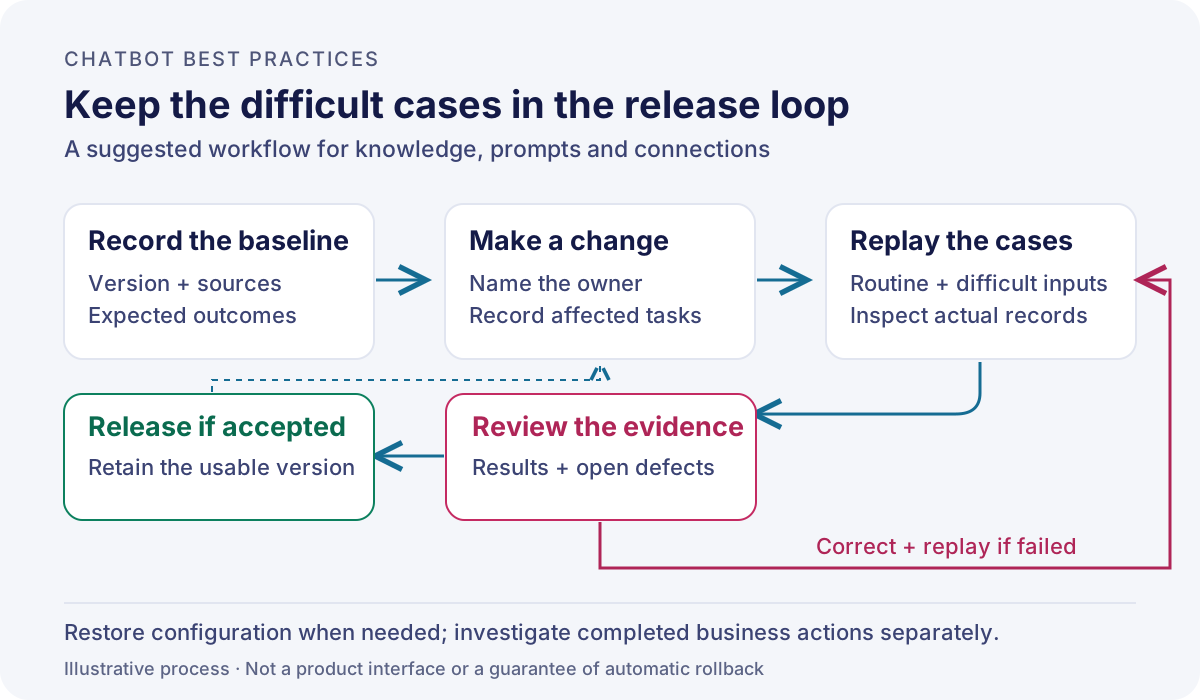
Google’s Dialogflow CX best-practices documentation recommends agent versions for production traffic and an up-to-date exported backup. Those are useful product-specific examples of retaining a known configuration. Confirm the equivalent release and recovery controls in your own deployment. (Google Cloud, accessed 2026).
Record the version, source changes, relevant conversations, reviewer and unresolved defects for each release. A knowledge edit may affect a policy answer; a connection change may affect every action using that connection. Select checks according to that impact rather than repeating only the scenario that prompted the change.
Try the recovery procedure before you need it. Restoring a configuration does not undo a refund, appointment or other action already completed elsewhere. If a release performed incorrect actions, assign a separate investigation and customer follow-up. Record that distinction in the release instructions.
Read pilot results by task and language
Review the outcomes against the task definitions you agreed at the start. Count unique requests that met the completion criteria and keep abandoned conversations, unresolved requests and repeated contacts visible. A closed session needs an outcome classification before it can contribute to a resolution measure.
Use the same observation window when comparing groups. For example, a Friday launch checked only until Friday evening may miss customers who return on Monday. Choose a follow-up window suited to the task and apply it consistently; report recent requests separately while that window is still open.
Split the review by task, language and channel where the sample supports it. Inspect the request mix before explaining differences. A group handling simple published questions cannot establish what will happen to a group handling account exceptions. For small samples, review individual failures and report the counts without presenting an unstable percentage as a dependable benchmark.
Include the people who keep the process running. Record time spent reviewing answers, investigating uncertain actions, correcting knowledge and dealing with repeat contacts. Customer satisfaction feedback can add context, but report how many customers responded and which tasks they experienced. Silence from the rest doesn’t establish satisfaction.
When requesting a proposal, compare its pricing scope with that workload: software usage, staffed coverage, review and maintenance may be separate items. Check which team owns each item and what the quote includes before attributing a cost change to the chatbot.
Decide whether the next release is ready
Before widening the pilot, ask the owners to answer these questions using the records they inspected:
- Can we demonstrate completion for every task in scope? If an answer or submitted request is the only available evidence, narrow the completion claim to what that evidence supports.
- Can a person continue every unresolved case we tested? If the receiving queue lacks context or coverage, repair the handoff and repeat the scenario.
- Can we repeat the checks and recover the configuration? If the team cannot identify the deployed version or rerun its difficult cases, keep the release limited until it can.
Keep these chatbot best practices in a release record that the knowledge owner, integration owner and support supervisor can inspect together. Expand the scope when the evidence supports the next task and someone has accepted responsibility for its exceptions.
References
- Microsoft Learn: Test your agent with knowledge sources, accessed November 3, 2026.
- Amazon Bedrock: Get user confirmation before invoking an action, accessed November 3, 2026.
- Google Cloud: Dialogflow CX best practices, accessed November 3, 2026.
- Intercom: Deploy Fin AI Agent over chat, accessed November 3, 2026.
- Callnovo.ai: Experiment archive, “Fully Autonomous Chatbot,” April 15, 2024; archive last updated February 3, 2025.