

Ecommerce Chatbot: Orders, Returns and Human Handoffs
Choose an ecommerce chatbot by testing order lookups, return intake and human handoffs. Compare workflows, access requirements and failed-query handling.

A shopper asks where two parcels are. Your ecommerce chatbot finds one delivery record, cannot retrieve the other, and replies that the order has arrived. The answer sounds clear. It also sends the customer back to support with a harder problem.
The chatbot answers shopping or service questions through a conversational interface. Depending on its configuration, it may use published information, retrieve account records, collect details or pass a request to a person. Those tasks need different access and different tests.
For a support manager choosing software, the useful question is what happens to a request all the way through the workflow. This guide concentrates on order questions, return intake and product issues. Use the examples to compare a demonstration with the work your team actually handles.
Choose the first ecommerce chatbot task
Choose a repeated task with an outcome you can inspect. “Handle the support queue” is too broad for a first trial. Explaining a published return window, retrieving a shipment status and approving an exception each needs a different source or decision maker.
| Customer request | Information needed | Useful result | Owner when it cannot finish |
|---|---|---|---|
| Where are my parcels? | Authorized order reference and shipment records | Each parcel matched with its available status | Order support |
| Will this part fit? | Exact product and relevant model details | Supported compatibility guidance or a review request | Product specialist |
| Can I return this item? | Purchase context and applicable return policy | Eligibility information or a submitted request | Returns team |
| The device still fails | Model, error and troubleshooting already attempted | A next diagnostic step or a useful service record | Technical support |
These ecommerce chatbot use cases are starting points for a pilot. Choose one with the people who manage the queue, then agree what the bot may do without approval. A return-policy answer can be useful even when a person must authorize the return.
Keep the initial scope narrow enough to review individual failures. Include the channels and languages that customers actually use. A web demonstration says little about an email thread with attachments or a phone call with a misheard identifier. If a task moves between channels, test that move separately.
Set the baseline before enabling the workflow. Record the types of request, the information agents need and the reasons customers contact you again. After launch, compare the same categories. A shorter conversation can mean a quick answer, an abandoned session or an unrecorded handoff; inspect the outcome before calling it an improvement.
Separate store knowledge from account access
A published sizing guide and a customer’s delivery address need different controls. Start by separating public information from account-specific records, then decide whether the requested operation only reads data or changes it.
A knowledge base supplies information such as device instructions and published policies. Give each source an owner, an applicable product or market, and a review date. When a customer names a discontinued model, the workflow needs the instructions for that model. Replacing them with the current model’s instructions may produce a confident but unusable answer.
Order status requires an authorized connection and an access check. Shopify’s order-status documentation explains that access to full order details depends on the customer’s authentication state. Customers may need to log in. Alternatively, they may need the order number and the contact information used at checkout. (Shopify Help Center, accessed 2026). Those rules describe Shopify’s order-status page; define and test the appropriate access checks for your own chat integration.
An order number locates a record. Don’t assume that knowing it authorizes disclosure of every field in that record. Ask the integration owner which information the chatbot receives, which fields it can show, and what happens when verification fails.
| Operation | Permission to define | Evidence to inspect |
|---|---|---|
| Read a public returns policy | Access to the approved source | Correct market and policy version |
| Retrieve a customer’s shipment | Access to the appropriate order and allowed fields | Verification result and matched shipment |
| Submit a return request | Permission to create the request | Request identifier and receiving queue |
| Issue a refund or change an address | Explicit transaction authority and any required approval | Recorded decision and system result |
A successful lookup doesn’t establish permission to change an order. Keep those operations separate in the demonstration. Ask the supplier to show a denied operation as well as an allowed one. The customer’s reply should explain the next available step without exposing internal credentials or sensitive error details.
Build a workflow around exceptions
The following ecommerce chatbot examples are illustrative test scenarios. They are designed to expose missing information and ownership; they are not transcripts or claims of measured customer results.
Keep every parcel tied to its own result
For a multi-parcel inquiry, collect the references and keep each lookup result beside the reference that produced it. If the customer has already supplied a number, reuse it rather than asking for it again. Clarify which shipment is causing concern before issuing a general order-level answer.
Test a mixed response: one parcel delivered, one still moving, and one unavailable. The answer should preserve all three states. An unavailable record is not evidence that the parcel is lost. A carrier’s last tracking scan also does not authorize a new delivery promise.
Send an unresolved reference to the appropriate queue with the last available status and the failed attempt. A receiving agent should be able to tell whether the problem is missing customer information, an inaccessible source, or a delivery exception. That distinction determines the next action.
Collect compatibility details before deciding the remedy
A fitment problem needs more than the phrase “wrong item.” In a vehicle-accessory example, the support team may need the purchased item, the vehicle model and year, and photographs that show the mismatch. Ask only for the details relevant to that product and the next decision.
Use approved product information to explain what can be established. If the evidence conflicts, create a review request for the specialist. Avoid turning a likely match into a guarantee or treating a photo upload as approval for a replacement.
Callnovo.ai’s existing anonymous automotive-parts case material describes an AI-first arrangement for routine order and policy inquiries, with human support handling difficult fitment, damage and refund situations. The original example includes voice support. The relevant lesson for a chat pilot is the division of responsibility; it doesn’t establish that every channel has the same implementation or result.
Record troubleshooting without making the customer start again
For a technical problem, ask for the model and the observed error before offering the relevant instructions. Record what the customer has already tried. Repeating the first diagnostic step after they have explained that it failed makes the interaction harder to complete.
If the approved steps don’t solve the problem, collect the information the technical team needs and retain the attempted steps in the handoff. Make any upload requirement clear. Do not request passwords or payment credentials to complete a troubleshooting form.
Test whether a person can continue from that record. If the specialist still needs to repeat the entire intake, identify which field or conversation detail was lost. Our ticket triage guide explains how urgency and authority affect the receiving queue.
Distinguish a return request from a completed refund
A bot can explain a return policy and gather information while a person checks an exception. Keep the status explicit. “Request received,” “return approved” and “refund issued” describe different events.
Ask the supplier to show which event creates each customer message. A generated reply is not proof of a transaction. Where an authorized action is supported, inspect the result in the system that performs it and test what happens after a timeout. Repeating an uncertain operation without checking its earlier result can create duplicate work.
For an email follow-up, retain the case reference and the current decision in the thread. The email ticketing system guide covers ownership and delivery checks after the conversation leaves chat.
Compare operating models with the same request
Bring a small set of your own anonymized requests to each demonstration. Include routine questions and failed lookups. Comparing every vendor against the same cases makes differences in access, ownership and exception handling easier to see.
| Model | What you are evaluating | What to ask the supplier to demonstrate |
|---|---|---|
| Answers from approved content | Source selection and policy accuracy | An outdated instruction and a question the source cannot answer |
| Connected support workflow | Account access, lookups and permitted actions | A valid record, a denied request and an unavailable system |
| AI with staffed follow-up | Context transfer and human responsibility | A person receiving an unresolved case and taking the next action |
When assessing an AI chatbot for ecommerce, clarify whether the main task is helping shoppers choose products or resolving post-purchase questions. Gorgias describes its Shopping Assistant as a pre-purchase capability that uses shopping and product context. That is a different demonstration from investigating a damaged item. Neither scope proves the other.
Likewise, Intercom’s ecommerce page presents connected order context and human handoff as part of its offering. Treat that as the supplier’s description of its product, then ask to inspect the workflow you need. A feature label doesn’t settle your account permissions, channel setup or coverage arrangements.
For a Callnovo.ai evaluation, HeroChat is the conversation layer to discuss, while HeroDash provides the broader support workspace. Bring a concrete lookup, the source it should use and the conditions that require a person. Confirm which channels and authorized integrations support that configuration before agreeing the scope.
Callnovo.ai offers human support in 65+ languages; confirm staffing for the language and hours you need through the multilingual support service. If you also need people to operate the queue, include the ecommerce customer service team in that discussion. Specify who handles technical exceptions, refunds and messages received outside the staffed hours. Buying software and arranging a staffed service have different responsibilities, even when they form one customer experience.
Include ongoing work in the commercial comparison. Who updates policies, reviews failed answers, tests an integration change and handles reopened cases? Ask how usage and human follow-up are charged. Review the Callnovo.ai pricing options alongside the project scope. Use the supplier’s current quote for your expected workload; a public starting price rarely answers all those questions.
Test the handoff in the receiving queue
A handoff test ends when the receiving team has enough context and authority to act. Inspect the receiving view rather than relying on the chatbot’s final message. Shopify’s chatbot guide also recommends defining human handoff rules and availability expectations during setup (Shopify, accessed 2026).
Give the receiving agent the customer’s request, the relevant reference, the attempted actions and the unresolved question. Include the source conversation so they can verify the summary. Where a lookup failed, record that failure separately from a verified business status.
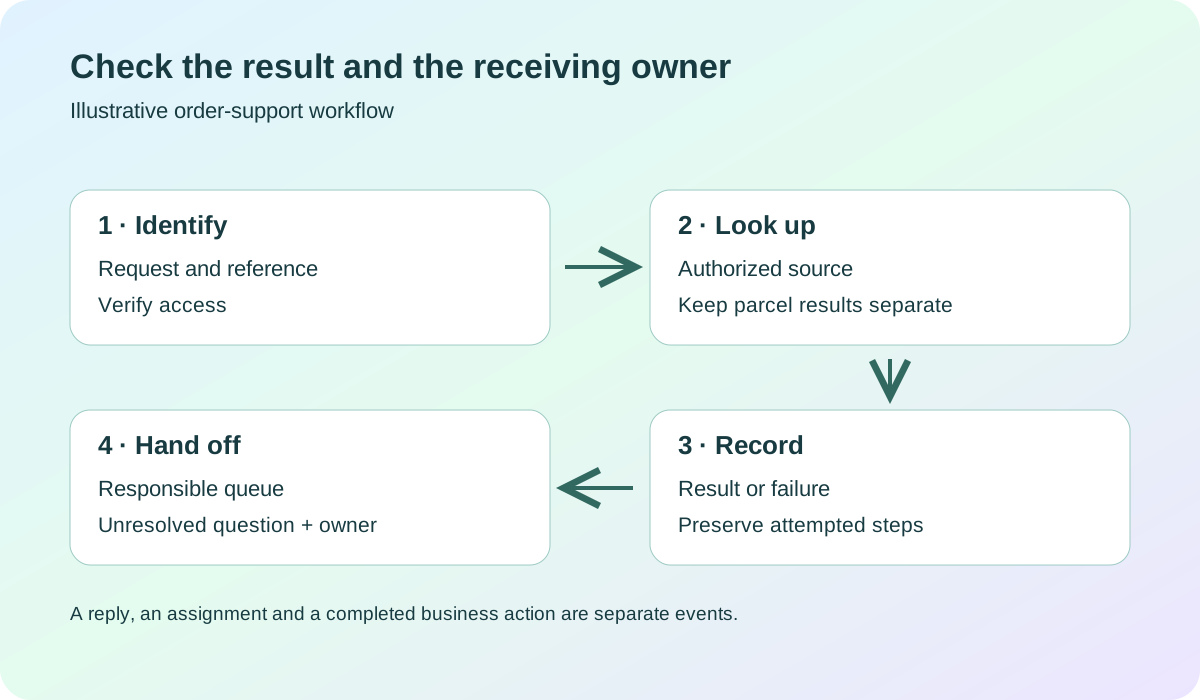
Illustrative workflow for evaluation, not a product screenshot.
Test an explicit request for a person, an unresolved repeat question, a failed lookup and a case outside the bot’s authority. When no suitable agent is available, the message should explain the agreed follow-up route. An always-open chat box does not establish round-the-clock specialist availability.
Keep a review sheet with the test input, expected behavior, actual response, receiving queue and unresolved defect.
- Confirm the correct reference and access decision.
- Inspect the actual lookup result or recorded failure.
- Open the receiving queue and check the next owner.
Separate answer quality from transfer quality. A correct answer may still have the wrong owner for a promised follow-up; a well-routed case may contain an incorrect summary.
When changing a rule, repeat the cases that previously passed as well as the failed case. For a pilot involving more than one language, test identifiers, policy conditions and product terms in each supported language. A fluent translation can still attach the right explanation to the wrong item.
Questions to settle before launch
- Can your ecommerce chatbot show the source and permission behind each account-specific answer? If the team can only show a generated sentence, resolve the access and evidence gap before widening the workflow.
- Can the receiving agent continue without repeating the customer’s intake? If the handoff loses references or attempted steps, fix the record and test it again in the receiving queue.
- Who owns requests that remain unresolved after the bot stops? If there is no queue, coverage arrangement or follow-up owner, keep the pilot limited until that work has a destination.
References
- Shopify Help Center: Understanding order status pages, accessed November 2, 2026.
- Shopify: AI Chatbot Customer Service, accessed November 2, 2026.
- Gorgias: Shopping Assistant explained, accessed November 2, 2026.
- Intercom: Customer support for ecommerce brands, accessed November 2, 2026.