

Email Ticketing System: Compare the Work Behind the Inbox
Choose an email ticketing system by testing ownership, reply threads, delivery failures and AI review. Compare mailbox and help desk workflows.

Two agents open the same customer email. One promises a replacement; the other asks for a photo. The customer replies to an older message, and a third colleague starts a new conversation without seeing either decision.
An email ticketing system turns incoming messages into trackable work, with an owner, a status and a conversation history. Its value depends on how well those records support the people handling the request. Moving messages into a new interface won’t resolve unclear responsibilities on its own.
This guide compares a shared mailbox, a collaborative inbox and dedicated help desk approaches. Test how each setup handles an absent agent, a changed subject and a failed outbound reply.
Start with the work your inbox cannot track
Choose the operating model around the failures you need to prevent. A small team with straightforward correspondence may need shared access and explicit ownership rules. A team coordinating several departments may need assignment, service deadlines and a history of decisions across handoffs.
| Approach | Where it can fit | What to demonstrate |
|---|---|---|
| Microsoft 365 shared mailbox | Shared correspondence managed within an existing email setup | Access, sending permissions and the team’s ownership method |
| Help Scout collaborative inbox | A team coordinating replies and customer context | Assignment, internal discussion and collision alerts |
| Zoho Desk | Support organized around tickets, deadlines and workflows | Routing, SLA conditions and exception ownership |
| Zendesk | A support operation needing ticket workflows and failure investigation | Conversation history, failure visibility and connector limits |
Each approach below addresses a different operating need. The comparisons below use the vendors’ own descriptions of their products. Have the supplier demonstrate the specific configuration and plan you intend to buy.
Bring actual examples of lost work to the demonstration. An email that waited for a specialist, a duplicate answer and a reply that reached the wrong recipient are more useful than a generic request to show the dashboard. Remove personal and confidential information before sharing examples with suppliers.
Compare the same workflow in every demo
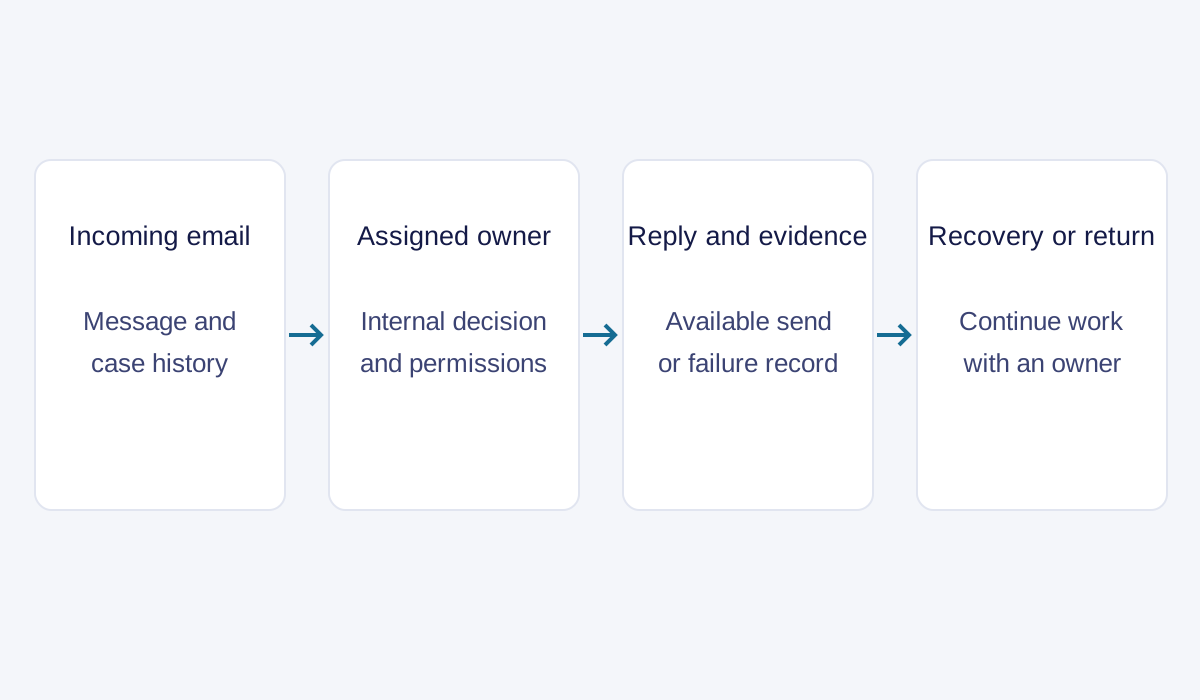
Test customer service email management software using the same request sequence. Begin with an incoming message, add an internal handoff, send a reply and return to the case later. This makes the comparison about how work is handled, rather than which interface looks fastest in a prepared presentation.
Follow the thread and identify the owner
A thread should let the next agent understand the customer’s current issue and the commitments already made. Test a normal reply, a changed subject and a forwarded message. Ask the supplier to explain when the system joins a conversation and when it creates another ticket. Don’t assume every tool uses the same rules.
Make ownership explicit. Check what happens when the current agent goes off shift, another team needs to act, or a supervisor reassigns the case. The customer should have a clear next step while that internal work happens. A private note can help colleagues collaborate, but it doesn’t itself tell the customer when to expect an answer.
Define the service clock
A service-level agreement, or SLA, defines the response or resolution commitment for specified work. Ask which event starts the clock, whether business hours apply and what happens while the team waits for the customer or another department. A fast acknowledgment and a useful answer should be distinguishable in the reports you use.
Check a reopened case as well. If the original issue remains unresolved, the reporting should help you recognize the repeat contact. Otherwise, closing and reopening work can make a queue appear more productive while customers keep asking the same question. Your operational definition needs to be consistent before you compare the numbers.
Test the outbound message
Have an agent send a reply from the proposed support address. Inspect the visible sender, recipients, attachments and conversation record. Then test an address or condition that produces a known failure, using a controlled test mailbox. Record who sees the failure and what action they should take.
Zendesk’s delivery-failure documentation describes warning messages and events for failures it can see. It also explains that confirming a handoff for delivery doesn’t establish final delivery to the recipient. Its listed exceptions include email sent through the Gmail connector or authenticated SMTP connector. (Zendesk, 2026)
That gives buyers a precise question: what can this configuration actually observe? A workflow should distinguish attempted sending, a reported failure and a confirmed outcome within the tool’s visibility. It shouldn’t label a customer informed simply because an agent clicked Send.
| Test record | Evidence to keep |
|---|---|
| Incoming request | Ticket identifier and relevant message history |
| Assignment | Current owner and reassignment event |
| Internal decision | Private note or approval record with context |
| Outbound reply | Recipient, content and available send result |
| Exception | Failure, responsible person and recovery action |
| Return contact | Link to previous work and the remaining issue |
Test the AI review and sending path
Use the same message to test three separate questions. Can an agent edit a proposed draft before sending? What happens when the configured pre-send review does not allow automatic sending? Does the receiving person get the customer’s details, the attempted lookup and the unresolved request?
A useful demonstration leaves each outcome visible. Inspect the draft and edited version, the send or blocked-send state, and the responsible queue. Keep uncertain messages assigned while they await review. An acknowledgment establishes receipt; it does not prove that the requested business action is complete.
HeroDash email AI explains agent-approved drafts and configured AI review before automatic sending. For a store inquiry, the ecommerce chatbot workflow supplies matching lookup and handoff tests. Evaluate the actual mailbox configuration rather than assuming that a chat feature works identically in email.
Compare four approaches to managing email
Shared inbox software and help desk software overlap, so product labels alone don’t settle the choice. Use the capabilities you need as the comparison dimensions: access, collaboration, service rules and recovery. Judge the proposed setup on the complete path through those requirements.
Microsoft 365: shared access within the mailbox
Microsoft’s shared mailbox documentation explains how multiple people can use a mailbox and how authorized users can send as it or on its behalf. It treats access and sending permissions as administrative responsibilities. (Microsoft, n.d.)
This can be a reasonable starting point when correspondence is straightforward and the team already has a workable method for assigning responsibility. During evaluation, demonstrate that method. Open the same conversation as two team members, identify who should reply and show where the decision is recorded.
The shared mailbox documentation establishes email access capabilities. Your service workflow may require additional tools. If you require case-level SLA reporting, escalation or structured ownership, show how the proposed setup supplies it. Include any additional tool or manual process in the operating plan and cost comparison.
Help Scout: coordinated replies and internal discussion
In its email software guide, Help Scout describes its own collision detection, internal notes and customer profile alongside conversations. Those features address a team coordination problem: people need to know what their colleagues are doing before they answer.
Test collision behavior with two agents preparing responses at the same time. Ask what the warning means and what each person can still do. A warning is useful only if the team understands how to respond to it. Then add an internal note and confirm that the customer’s outgoing message excludes the private discussion.
For a relationship-focused team, preserving context can matter more than an elaborate queue hierarchy. Still, inspect reassignment and reporting with your own scenario. A friendly conversation view needs to support the responsibilities you expect managers and agents to carry.
Zoho Desk: ticket assignment and service rules
Zoho’s email ticketing product page describes incoming email conversion, assignment, private comments and workflows. It also describes SLA conditions for response and resolution. These mechanisms are relevant when a request needs a defined owner, a deadline and escalation when work stalls.
Ask the supplier to build a small rule using a realistic request type. Change one condition and observe whether the assigned team and deadline change as expected. Then make the assigned person unavailable. The demonstration should show how work remains visible and who handles the exception.
Rules need maintenance as the business changes. A new support address, customer category or working schedule can affect routing. Have an administrator explain where those settings live and how the team will review changes before relying on them in production.
Zendesk: inspect the failure path alongside the workflow
Zendesk’s email ticketing guide presents ticket management and service workflows as part of its support offering. For evaluation, pair the product overview with the detailed delivery documentation cited above. The latter shows why connector behavior deserves its own test.
Ask an administrator and an agent to examine the same failed message. Can they identify the affected recipient and connect the event to the customer’s case? Can they establish whether a resend is appropriate? Check what happens when the original conversation is archived and which records remain available.
A failure notification needs an operating response. Decide who corrects an address, contacts the customer through another agreed channel or investigates a sending configuration. Keep those responsibilities in the rollout plan so a visible error doesn’t become another unattended queue.
Match the system to the team doing the work
The best fit depends on who handles the request after it arrives. Customer service email software can support a small internal team, several specialist groups or a service operation that combines software with outsourced agents. Compare those arrangements using the same case, while allowing their staffing responsibilities to differ.
For a team with straightforward correspondence, start by proving ownership and continuity when someone is absent. For a specialist support team, inspect how technical details and decisions survive a handoff. For a multilingual operation, keep the customer’s original message available alongside any translation so an agent can verify terminology and meaning.
Add AI where a reviewable task exists
Use AI email support first on a bounded task that your team can inspect: classifying a request, locating relevant knowledge or preparing a draft. Give the knowledge base a named owner who reviews outdated answers and conflicting policies. Define when a person reviews the output and what happens if required information is missing. Writing a plausible reply and completing the requested action require different checks.
A customer letter about a HeroDash implementation describes email grouping and knowledge-based handling of different message types. That provides a concrete mechanism to examine in a demo. It doesn’t establish a universal resolution rate or remove the need to test your own categories, source material and exception process.
Callnovo.ai’s HeroDash platform brings service channels into a shared workspace. Its email AI workflow guide explains the product-specific approach separately. Keep the procurement exercise focused on your required inputs, review steps and follow-up records, and use the guide to identify what to ask the product team to demonstrate.
Specify the human handoff
If your team needs language coverage or additional service capacity, Callnovo.ai provides human support in 65+ languages through its multilingual service. Agree which team owns each task, when it is staffed and which decisions remain with your business. A language list doesn’t answer who can approve an exception or investigate a delivery problem.
Compare the pricing and service scope with the staffing arrangement. Include mailbox configuration, knowledge maintenance, supervisor review and recovery work when assessing the operating cost. Keep software charges separate from human service charges so each part can be compared consistently.
A proposed handoff can follow this sequence:
- The receiving team gets the request, original message and relevant customer context.
- An owner accepts the case and checks what has already been promised.
- An authorized person resolves any decision that exceeds the agent’s permissions.
- The agent communicates the outcome and records the available delivery evidence.
- A later customer response returns to visible, owned work.
This is a suggested acceptance sequence. Apply it to the configuration you are evaluating, including the exceptions. Our ticket triage guide covers the earlier decision about which work needs attention first.
Questions to answer before moving the mailbox
Before moving to a new email ticketing system, settle the ownership of the migration as well as daily work. Decide which conversations move, who validates forwarding and how the team will recover if the new route fails. Avoid testing with real customer messages until the configuration and permissions are ready.
- Can two agents identify who owns the same request? If they have to ask in a separate chat every time, the ownership process still depends on memory.
- Can the team recognize a failed reply and recover it? If the report only records Send clicks, it doesn’t establish that the customer received the information.
- Can a returning customer continue the original issue? If the history splits without a useful link, the team may repeat decisions or contradict an earlier promise.
- Can a supervisor explain the SLA report? If acknowledgments, substantive answers and reopened work are mixed together, the numbers won’t support a fair comparison.
- Who reviews the rules after launch? If no one owns configuration changes, a working pilot can drift when the service team or product changes.
The acceptance record should show how your own team answered those questions, including the failures it resolved before switching the support address.
References
- Microsoft: About shared mailboxes in Microsoft 365. Accessed November 2, 2026.
- Help Scout: Email ticketing systems. Product’s own description only; accessed November 1, 2026 (New York).
- Zoho Desk: Email ticketing system. Accessed November 2, 2026.
- Zendesk: Understanding email delivery failures. Updated October 2, 2026; accessed November 1, 2026 (New York).
- Zendesk: Email ticketing systems. Accessed November 2, 2026.