

WISMO: handle order inquiries and measure repeat contacts
Handle WISMO inquiries with shipment checks, accountable handoffs, and a worked example. Learn to separate repeat contacts, affected orders, and open issues.

WISMO means “Where Is My Order?” In customer support, it covers inquiries about an order’s location, status, or expected delivery. A useful answer connects the customer’s question to the right shipment and, when something is wrong, to a person who can take the next action.
The difficult cases often start with a plausible answer. A customer receives a tracking link, follows it, and sees the same event as before. They call the next day. Your helpdesk now holds two contacts, but the delivery problem may be unchanged.
This guide explains what to check, how to keep an exception moving, and how to calculate repeat contacts from a small event log. The workflow and numerical examples are proposed methods, not customer performance results.
What WISMO means for your support team
WISMO inquiries can arrive by email, chat, phone, or another support channel. “Has it shipped?” and “Only one box arrived” both belong in an order-status workflow, but they require different checks.
WISMO tickets are the helpdesk records used to manage these inquiries. A ticket is not necessarily one contact: a customer can return to the same ticket, or a second channel can create another ticket for the same problem.
| Unit | What it identifies | Example |
|---|---|---|
| Order | The purchase | Order A contains two parcels |
| Shipment | A particular parcel or shipment record | Parcel A1 has arrived; A2 has not |
| Issue | The problem being followed | A2 has no carrier acceptance event |
| Contact | One inbound interaction under your counting rule | An email, followed the next day by a phone call |
| Ticket | The record in the support system | Both contacts may belong to one ticket or two linked tickets |
Define a contact before building a report. For the example later in this guide, a chat session is one contact, a phone call is one contact, and a new inbound email interaction is one contact. Individual messages within the same chat are not separate contacts. Your systems may use different boundaries; document them and keep them stable.
Here, WISMO refers to the support workflow. Tracking apps with the same name are separate products. It also keeps a new product defect or refund question distinct from the original delivery issue, even when they share an order number.
Check the order and each parcel before answering
Identify the customer and order through your approved verification process. Then check which item or parcel the customer means, what the store records, and what the carrier actually reports. Preserve uncertainty when those sources disagree.
Separate store status from carrier events
Shopify documents separate order, payment, fulfillment, and return statuses. It also distinguishes partial from complete fulfillment. These are Shopify’s operational states; use your own platform’s definitions when working elsewhere.
A tracking number is another piece of information, not proof of every shipping milestone. USPS explains that “Shipping Label Created, USPS Awaiting Item” means it has not yet received the package. Its possession status describes a different event. Check other carriers’ own definitions before translating their labels into a customer promise.
Record the last event, when it occurred, and when your team retrieved it. An integration refreshed at 10:00 can still be showing yesterday’s scan. If there is no supported delivery estimate, say that the estimate is unavailable and explain the next check.
For Shopify stores, the official tracking guide describes how customers access updates through the order status page, shipping emails, and Shop. The available information depends on tracking details, carrier support, and any third-party fulfillment integration. Verify that the customer-facing link opens the relevant shipment and reflects the information your agent is using.
Identify the parcel behind a split shipment
Use a parcel-level view when an order has multiple shipments. The following is a fictional working record, not a description of a particular platform’s interface.
| Field | Parcel A1 | Parcel A2 |
|---|---|---|
| Items | Main product | Accessory |
| Latest available event | Delivered scan | Label created; awaiting carrier |
| Customer report | Received | Missing |
| Next action | No delivery follow-up required for this parcel | Ask the warehouse to confirm handover |
Keep the unresolved A2 issue open even though A1 is complete. If the customer later reports damage to A1, create a distinct issue and link it to the order. Otherwise, a useful report about repeat delivery inquiries can become a mixture of unrelated problems.
For delays, retain both the date previously communicated to the customer and the latest supported estimate. That lets the next agent explain what changed without treating every new estimate as a guarantee.
Decide what the next person needs to do
After checking the evidence, choose between answering a status question, requesting an investigation, and seeking approval for a remedy. Use this sequence:
- Identify the question that the current evidence can answer.
- Assign any remaining investigation or approval request.
- Confirm that the recipient has accepted the task.
- Record the result and send the next customer update.
Each type of action needs a different completion record.
| Situation | Next action | Evidence to retain |
|---|---|---|
| Current status answers the question | Explain the event and available next step | Source, event time, and message sent |
| Carrier acceptance is missing | Ask the responsible shipping team to check handover | Named recipient, acceptance, and result |
| A delivered scan conflicts with the customer’s report | Follow the carrier-specific checks and investigation route | What was checked and the reference for any request |
| Replacement or refund needs approval | Send the required facts to an authorized decision-maker | Decision, permitted action, and execution result |
For a USPS delivered scan where the package cannot be found, its tracking guidance lists checks such as the delivery area and other household recipients. Use the applicable instructions from the linked USPS page, including the next step for that status. A merchant’s remedy decision and a carrier’s investigation process should remain separately visible.
Send an update that says what is known
Proactive notifications can keep customers informed when you have a meaningful update. Match the message to the evidence and the channel arrangements in place. Repeating an unchanged estimate can create expectations your team cannot support.
Here is a hypothetical reply for the missing accessory:
“The main item shows as delivered, and you have confirmed receiving it. The accessory has a tracking number, but the latest carrier record does not show acceptance. I have asked our shipping team to check the handover. I will update you by 3 p.m. Eastern tomorrow, even if that check is still open.”
That update time is a commitment chosen for the example, not a standard service level. Choose one your team can meet. It commits to another communication while leaving the delivery outcome accurately unresolved.
Keep the handoff open until it is accepted
Record who sent the task, who accepted it, what decision or action is needed, and when the next review is due. “Forwarded to logistics” proves dispatch of a request. It does not prove that logistics has begun working on it.
If nobody accepts, the current owner keeps responsibility for follow-up. When a refund or replacement is authorized, record the action’s result separately from the approval. If a system request times out, check whether it executed before trying again; the integration needs a defined way to handle an uncertain outcome.
A chatbot for ecommerce can be part of the answering workflow when it has the required data and permissions. If you use an outsourced ecommerce support team, agree on the same ownership, access, and escalation rules before handing over the queue. For an email queue, our guide to choosing an email support provider lists the contract terms to settle first.
Measure first contacts and repeat contacts separately
To reduce WISMO, first make clear what your report counts. WISMO calls measure the phone channel. WISMO inquiries across all channels measure a broader workload. Neither is automatically the number of affected customers or orders.
The small example below shows why the distinction matters. It uses a fictional cohort of 10 orders and a complete observation window from order creation through 14 elapsed days after each order. Every order has reached that cutoff, and all matched events below fall within their order’s window. Four orders receive matched WISMO contacts; the other six receive none. The 14-day window is a chosen reporting rule, not an industry benchmark.
Choose a cohort and an observation cutoff
Before counting, keep a stable order ID, shipment ID where relevant, issue ID, contact ID, direction, channel, and timestamp. Keep an unmatched-contact queue for records that cannot yet be assigned to an order. Do not force them into a convenient denominator.
| Event | Order / issue | Record | Treatment |
|---|---|---|---|
| E01 | A / A1 | Inbound email | First contact for A1 |
| E02 | A / A1 | Inbound phone call on the following day | Repeat contact for A1 |
| E03 | A / A1 | Duplicate import of E02 with the same contact ID | Exclude the duplicate record |
| E04 | B / B1 | Inbound chat session | First contact for B1 |
| E05 | B / B1 | Outbound status update | Exclude from inbound-contact count |
| E06 | C / C1 | Inbound email about parcel C1 | First contact for C1 |
| E07 | C / C2 | Inbound chat about a different parcel problem | First contact for C2; another contact on order C |
| E08 | D / D1 | Inbound phone call | First contact for D1 |
| E09 | D / D1 | Inbound email on the following day | Repeat contact for D1 |
| E10 | Unmatched | Inbound order-status email, order not yet identified | Report separately pending identification |
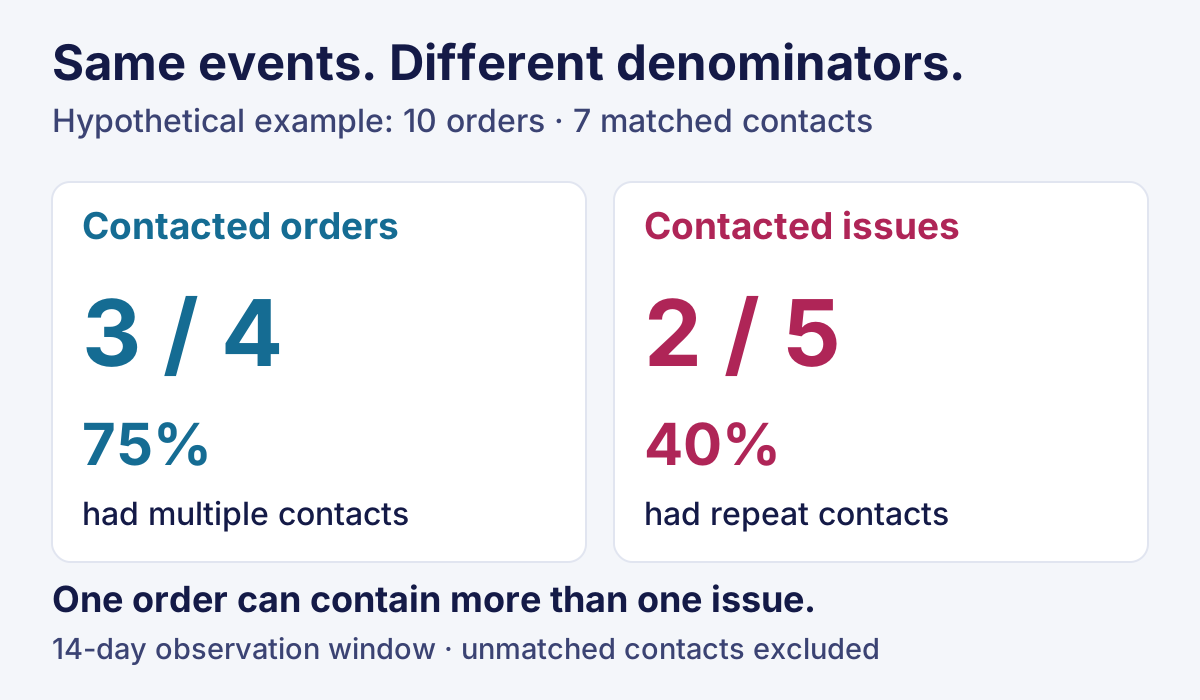
The matched data contains 7 inbound contacts, 4 contacted orders, and 5 issues. There are two issues with repeats: A1 and D1. Three orders have more than one contact: A, C, and D. C illustrates the difference: its second contact concerns another parcel problem.
| Metric for this cohort | Calculation | Result |
|---|---|---|
| Matched contacts per 100 orders | 7 ÷ 10 × 100 | 70 contacts per 100 orders |
| Orders with a matched contact | 4 ÷ 10 × 100 | 40% of orders |
| Contacted orders with multiple contacts | 3 ÷ 4 × 100 | 75% of contacted orders |
| Contacted issues with a repeat contact | 2 ÷ 5 × 100 | 40% of contacted issues |
| Additional same-issue contacts as a share of matched contacts | (7 − 5) ÷ 7 × 100 | About 28.6% |
The last formula works here because each of the five observed issues has exactly one first contact in the complete log. An issue carried in from before the observation window needs its earlier history before you can classify a contact as first or repeat.
Report the unmatched record alongside these figures: one unmatched inbound contact remains unallocated. The calculations are provisional until its cohort and issue can be established. Excluding it without disclosure would make the dataset look cleaner than it is.
Separate lower contact volume from resolved cases
A workload ratio can exceed 100 contacts per 100 orders. It is a count relative to order volume, not a percentage of unique orders. An order-level repeat measure also cannot tell you whether both contacts concern the same problem.
Compare cohorts using the same channel coverage, identity rules, contact boundaries, and elapsed observation window. Mark younger cohorts as incomplete. Keep longer-running issues in an open-issue view after the reporting cutoff rather than treating them as resolved.
Review repeat-contact reasons as well as counts: a promised update was missed, the customer could not use the tracking link, an action did not execute, or another parcel developed a problem. A reduction caused by missing channel data or a harder-to-find contact option would not establish an improvement in resolution.
Test your WISMO process before the next peak
Use test orders to check whether the workflow produces an accurate answer and an executable next step. Record what happened in each trial; an untested row remains open.
| Test | Evidence of a working process |
|---|---|
| Label exists without carrier acceptance | Reply distinguishes label creation from carrier receipt |
| One parcel arrives and another does not | Open issue stays linked to the missing parcel |
| Old event arrives through a recently refreshed integration | Reply preserves the event’s actual time |
| Receiving team does not accept the task | Current owner can see and follow up on the pending handoff |
| Action request times out | Team checks the result before a retry |
| Duplicate import and an unmatched contact enter the report | Duplicate is excluded; unmatched volume is disclosed |
Callnovo.ai uses HeroDash ticket triggers and scheduled automations to support work such as tagging, notifications, and follow-up rules. Event triggers and hourly scheduled checks behave differently, so test the rule you intend to use. Access to a particular order system, carrier action, or refund operation needs to be established for the project. A ticket changing to “resolved” is not evidence that an external delivery or payment action succeeded.
For operations spanning carriers and shipping teams, the logistics support overview provides context for discussing responsibilities. Start that discussion with a failed shipment and the records your team needs to move it forward.
Before calling your WISMO workflow ready, ask: Can the next agent distinguish the latest event from the latest refresh? Has someone accepted every outstanding action? Can another person reproduce the repeat-contact calculation from the underlying rows?
Bring an anonymized order, a failed handoff, and a sample contact export to a Callnovo.ai workflow review. Those three inputs make the data, permissions, and reporting requirements concrete.
References
Accessed November 9, 2026. Dates above identify publication dates where available, not performance measurement periods.