

What Is IVR? How Interactive Voice Response Works
Learn what IVR means, how keypad and voice menus work, and where self-service ends. Follow a sample call flow and plan a clear path to a human agent.
Callnovo company image library. The photograph illustrates a staffed support destination.
A customer calls about an order. Before anyone answers, a recorded voice offers options for deliveries, product support, and other questions. The customer presses a key, hears the next instruction, and reaches the appropriate team.
That exchange is a familiar use of IVR: an automated phone interaction that helps a caller get information or reach the next step. For a business designing the service, the next question is what happens after the selection. Does the customer receive an answer, reach someone who can help, or enter another menu?
What does IVR mean?
IVR stands for interactive voice response. An IVR system plays prompts and processes a caller’s response. The response can be a keypad selection or, when the system supports it, spoken input. It can provide information, collect details for a task, or help direct the call. Twilio’s IVR glossary describes both keypad and speech-based interaction.
A keypad menu uses DTMF, short for dual-tone multi-frequency signaling. Each key produces a signal the phone system can interpret. Speech recognition lets the caller say a word or phrase instead. The exact phrases a system understands depend on its design.
The word interactive matters. A greeting that only announces opening hours plays information. An IVR menu also accepts input and decides what to do with it. For example, it can offer opening hours as one choice and a route to customer support as another.
An IVR is therefore one part of a service process. It needs a destination for each choice: an announcement, an authorized self-service task, another menu, or a team that can answer. A polished recording cannot compensate for a destination that does not exist.
How does an IVR system handle a call?
A basic call flow starts when a customer reaches a phone number. The system applies the relevant configuration, presents a prompt, processes the response, and follows the matching branch. The branch may end in self-service or continue to a human agent.
Here is an illustrative flow for a fictional retailer, not a report of a customer deployment:
| Step | What the caller experiences | What the business must prepare |
|---|---|---|
| Arrival | A short greeting identifies the business. | The correct phone number and active call flow. |
| Availability | The system follows the appropriate business-hours route. | Opening hours, holidays, and an after-hours message. |
| Selection | The caller chooses an order question, product help, or another inquiry. | Labels based on the reasons customers actually call. |
| Destination | The order branch reaches the order-support queue. | A queue with appropriately assigned staff. |
| Exception | An unrecognized response leads to a retry or another route. | A defined fallback instead of a repeating menu. |
This example deliberately sends an order question to a team. If you want the system to read an order status automatically, the flow also needs access to the relevant data and a way to establish that the caller may receive it. Writing “order status” into a prompt does not create that connection.
Our phone-system configuration materials illustrate another dependency: keypad choices connect to skill groups, and the relevant agents must be assigned to those groups. Business-hours rules can send callers to a queue while it is open and to an out-of-hours announcement when it is closed. These are configuration choices; a recorded menu does not itself establish round-the-clock staffing.
Test the journey by placing a call from outside the organization. Listen to the complete prompt, make a selection, and follow it until someone answers or the promised information is delivered. Then repeat the test outside the configured hours. Reviewing a flow diagram alone will not show what the caller actually hears.
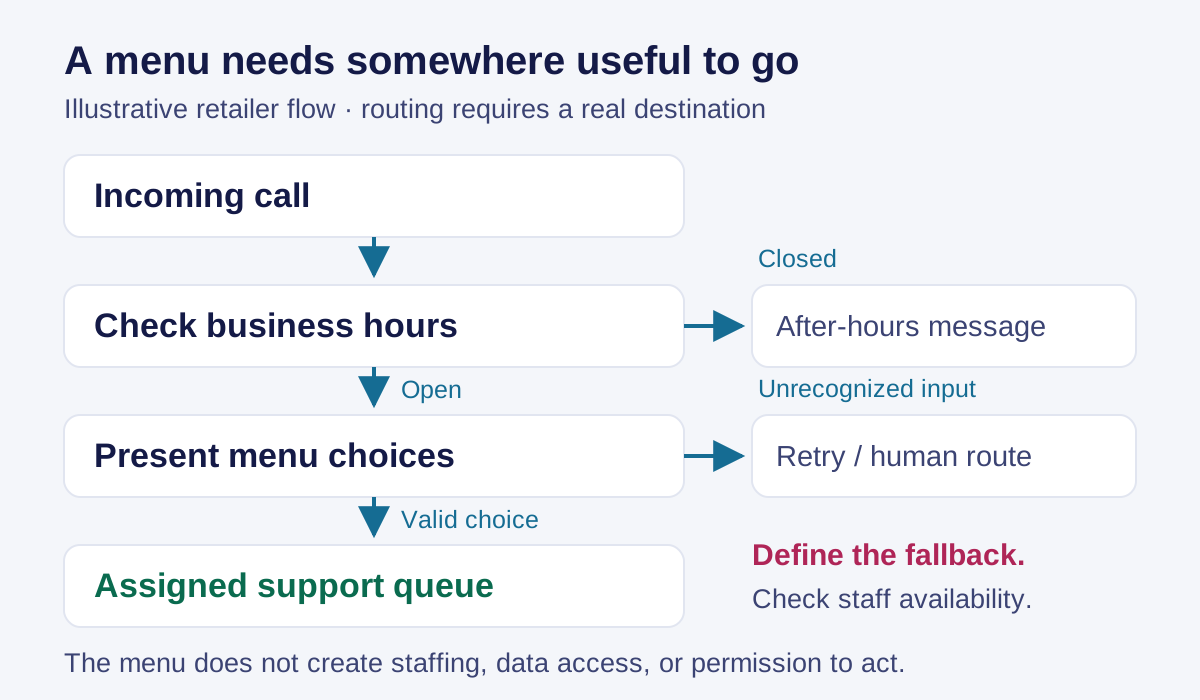
Illustrative routing flow. The business must configure each destination and its availability.
What can IVR do for customer service?
An IVR can help with several distinct tasks. Call routing uses the caller’s selection to identify a suitable destination. Self-service attempts to complete a request without a human conversation. Information delivery gives a caller an answer such as opening hours. These uses appear in IBM’s explanation of IVR, but their usefulness depends on the request and the supporting systems.
Start with a task that has a clear end. An opening-hours inquiry is complete when the caller hears the applicable hours. A product fault may require questions, troubleshooting, and a decision about replacement. The latter needs a much more capable process than an announcement.
For each proposed self-service branch, write down:
- The answer or action: what the caller should receive or accomplish.
- The information source: where the system will obtain an accurate answer.
- The access requirement: whether authentication is needed before information is disclosed.
- The exception route: what happens when the source is unavailable or the request cannot be completed.
Consider a caller asking where a parcel is. A tracking lookup might answer the question. If the parcel shows as delivered but the customer has not received it, simply repeating that status leaves the problem unresolved. That branch needs a route to someone who can investigate.
Judge the branch against its stated purpose. For an informational branch, check whether callers receive the correct answer. For a routing branch, check whether they reach the right team. A reduction in calls reaching agents does not, by itself, show that customers received help.
How is IVR different from ACD and an AI voice agent?
These terms describe related functions, and a contact-center product may combine them.
| Component | Main role in the call | A simple example |
|---|---|---|
| IVR | Interact with the caller through prompts and responses. | Ask whether the caller needs order help or technical support. |
| Automatic call distribution, or ACD | Distribute incoming calls according to routing rules and availability. | Send a technical-support call to an available member of the appropriate team. |
| AI voice agent | Support a conversational interaction, with capabilities determined by its knowledge and connected tools. | Ask follow-up questions about a request before answering or transferring it. |
IVR and ACD work together: the interaction helps establish where a call should go, and distribution handles its destination. See our call-routing guide for a closer look at queues and routing rules.
Conversational IVR lets callers describe a need in spoken language instead of navigating only numbered options. Product terminology can overlap with “AI voice agent,” so evaluate the actual behavior. Can it understand the request? Does it have an approved source for the answer? Can it carry out the required action? What happens when it cannot?
In our AI voice configuration process, a knowledge base is associated with a bot, the conversation settings are configured, and the instance is connected to a phone or web-call entry point. Creating the bot alone does not make it answer the intended number. Nor does a knowledge base, by itself, give it permission to change an order or issue a refund.
Ask to see the complete interaction for your use case, including human handoff. A natural-sounding voice is only one part of that demonstration.
When does an IVR menu help—and when does it get in the way?
An IVR menu helps when the choices are understandable and lead to a useful result. It becomes frustrating when the customer cannot find a matching option, must repeat information, or keeps returning to the same menu.
Write choices in the customer’s language. “Help with a product” describes a recognizable task. An internal department name may require the caller to understand how your business is organized before they can get support.
Review the exception paths as carefully as the normal path:
| Situation to test | Question to answer |
|---|---|
| No input: the caller remains silent. | Does the system repeat clearly and then offer a usable next step? |
| Invalid input: the caller presses an unassigned key. | Does the message explain the available choices? |
| Speech is not understood. | Is another input method or human route available? |
| The requested team is closed. | Does the message accurately explain what the caller can do next? |
| The customer needs a person. | Is the human handoff reachable, with honest information about availability? |
There is no useful universal menu length independent of the task. Begin with the fewest choices that distinguish real destinations, then test whether callers can identify the right one. If two choices lead to the same team and handling process, consider whether callers need to distinguish between them at all.
Also check the handoff from the agent’s side. If the caller already selected product support, the receiving team should not have to ask them to navigate the same menu again. Where the system supports passing context, verify what actually arrives and how the agent will use it.
What should you prepare before setting up IVR?
Prepare a short operating brief before choosing a menu design or an IVR provider. Include the reasons customers call, the destinations that can handle them, the hours those destinations operate, and the information each branch needs.
For a cloud IVR, hosting moves away from an on-site phone system, but your business still needs to own those decisions. Ask who will configure the flow, approve changes, test it, and update it when staffing or policies change. Technical support may be needed for parts of the setup.
A useful brief can fit on one page:
| Field | What to record |
|---|---|
| Caller task | The problem expressed in a customer’s words. |
| Menu choice | The prompt and accepted input. |
| Intended result | An answer, completed task, or staffed destination. |
| Dependencies | Data access, authentication, staff assignment, or operating hours. |
| Fallback | The next step when the intended result is unavailable. |
| Owner | Who approves and maintains this branch. |
Before launch, ask three questions. Can a new caller choose correctly? If not, revise the labels. Can each destination deliver what the prompt promises? If not, resolve the staffing or system dependency. Can someone recover from a failed interaction? If not, improve the fallback before adding more branches.
Before implementing IVR, decide which part of the call can usefully be automated and where a person needs to take over. If you are evaluating a setup with Callnovo.ai, explore HeroDash and bring your proposed call flow to the team so the configuration and handoff requirements can be discussed together.