


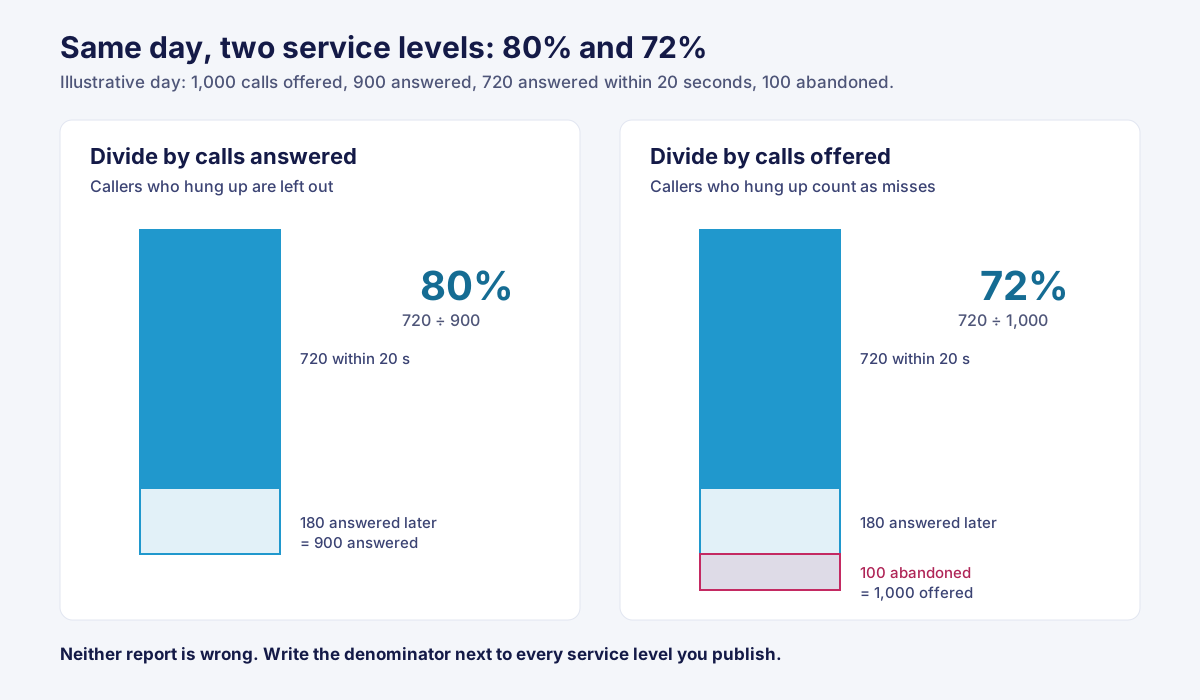
Your dashboard says service level was 80% yesterday. Your outsourcer’s daily report says 72%. Nobody made a mistake. The two reports divided by different numbers.
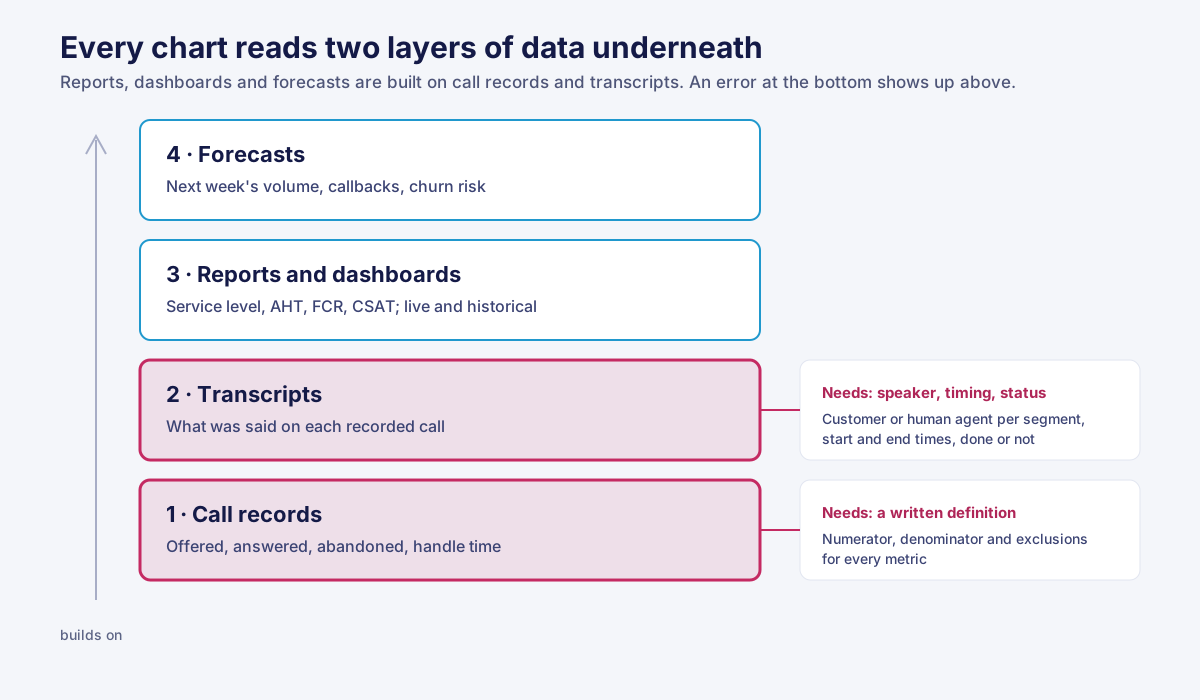
Call center analytics is the practice of turning call records, recordings, and transcripts into numbers a manager can act on. It works in layers, and each one is only as good as the layer under it.
This guide covers what sits under the charts: metric definitions, what a transcript must contain, and what to put in writing when someone else runs your phones.
On this page
- TL;DR
- What it covers
- Metric definitions
- Speech analytics
- Predictive analytics
- Software types
- Outsourced phones
- FAQ
TL;DR: call center analytics in one table
Analytics in a contact operation works in four layers: historical reporting, real-time dashboards, speech analytics on transcripts, and predictive models. Each layer inherits the errors of the one beneath it. A metric without a written definition, or a transcript without speaker labels, weakens every chart built on top.
| Layer | Question it answers | Where the data comes from | Where it usually goes wrong |
|---|---|---|---|
| Historical reports | What happened last week? | Call records: offered, answered, abandoned, handle time | Two reports use different denominators |
| Real-time dashboards | What’s happening right now? | The same call records, refreshed live | Today’s dashboard total doesn’t match tomorrow’s report |
| Speech analytics | Why did customers call, and how did it go? | Recordings, turned into transcripts | Untranscribed recordings are counted as “no issue” |
| Predictive analytics | What will next week look like? | Months of history | The outcome being predicted was never defined |
When a number looks wrong, the cause is rarely the chart. It’s a definition nobody wrote down, or a transcript that didn’t finish.
What contact center analytics covers, and what it’s used for
Contact center analytics covers four jobs: routine reporting, real-time monitoring, analysis of what was said, and forecasting. Software automates the arithmetic; the metric definitions stay a business decision.
Three terms often get mixed up:
| Term | What it means | Data it reads |
|---|---|---|
| Call center data analytics | Working with the raw records: filtering, joining, counting | Call logs, ticket history, CRM fields |
| Reporting | The numbers you publish on a fixed schedule | Aggregates of those records |
| Speech analytics | Search, classification, and counting run on what was said | Recordings and their transcripts |
Listening through analytics is growing. In research published in November 2025, speech and text analytics rose from 12.1% to 25% as a channel organizations use to hear from customers, while email surveys fell from 59.3% to 55.2% (Call Centre Helper, 2025).
Omnichannel teams need phone, chat, and email interactions in the same records, so a manager can follow one customer’s journey instead of three channel reports.
Use cases: what the analytics is for
Most analytics use cases in a call center come down to three: finding why customers call back, finding the hours when queues build, and finding topics that routing or the knowledge base handles badly. Each reads a different layer, and only some need transcripts.
| Use case | Call records | Transcripts |
|---|---|---|
| Repeat contacts about the same order | ✓ | Confirms the reason |
| Hours when the queue builds | ✓ | — |
| Callers sent to the wrong group | ✓ | ✓ |
| Questions the knowledge base doesn’t answer | — | ✓ |
| Conversations worth reviewing with a human agent | — | ✓ |
When one type of request keeps bouncing between groups, the fix is usually a rule change; see our guide to call routing software. Picking conversations for coaching opportunities belongs to quality assurance, covered below.
Call center metrics, analytics and reporting: every number needs a written definition
Most lists of KPIs name the same five metrics: service level, average handle time (AHT), first call resolution (FCR), abandon rate, and customer satisfaction (CSAT). The names agree across vendors. The math often doesn’t.
Service level is the number answered within a threshold, divided by a denominator, and the denominator is a choice. Take one illustrative day: 1,000 calls offered, 900 answered, 720 of those answered within 20 seconds, and 100 abandoned.
- Against answered: 720 ÷ 900 = 80%.
- Against offered: 720 ÷ 1,000 = 72%.
Both reports are correct, and they disagree by 8 points. The second counts the 100 callers who hung up as misses. The first leaves them out.
| Metric | Numerator | Denominator options | Common exclusions | When two reports disagree, ask first |
|---|---|---|---|---|
| Service level | Answered within the threshold | Answered, or offered | Abandons in the first few seconds | Which denominator, and is there a short-abandon cutoff? |
| Average handle time | Talk + hold + after-call work | Handled | Transfers, or very short calls | Is after-call work in, and is hold? |
| First call resolution | Issues with no repeat contact in the window | Issues, or contacts | Callbacks the team started | How many days is the window, and per caller or per issue? |
| Abandon rate | Callers who hung up before answer | Offered | Short abandons | Where’s the short-abandon cutoff? |
| CSAT | Satisfied responses | Survey responses | Unanswered surveys | Who got the survey? |
Customer satisfaction comes only from people who answered the survey. A survey sent only after resolved contacts raises CSAT without anything getting better.
That’s also the answer to the 80/20 rule. It means 80% answered within 20 seconds. Our Erlang calculator calls it “a common convention, not a standard,” and it means something only once you say which denominator you used.
So when your numbers and your vendor’s don’t match, compare definitions before you suspect the data.
Agent and queue-level reporting
Agent-level analytics and reporting need written definitions too: whether handle time includes after-call work, and whether available time starts at login or at a ready status. Without them, two supervisors can rank the same team differently.
One human agent’s illustrative week, calculated two ways:
| Definition | Talk | Hold | After-call work | AHT |
|---|---|---|---|---|
| Talk + hold + after-call work | 5:00 | 0:40 | 1:20 | 7:00 |
| Talk only | 5:00 | — | — | 5:00 |
Same person, same week, 2 minutes apart. Agent performance and agent productivity reports inherit whichever definition the system uses, so print it on the report. The same goes for any metrics like occupancy that you track per person.
Call center dashboard vs. reports
A call center dashboard shows what’s happening now; a report shows a past period. Both should come from the same call records, so today’s dashboard total matches tomorrow’s daily report.
| Real-time dashboards | Historical reports | |
|---|---|---|
| Time range | The current interval or day | A day, week, or month |
| Refresh | Live, every few seconds | Once, after the period closes |
| Used for | Live monitoring of queue and staffing | Trends, staffing plans, reviews |
| Reconciliation | Its end-of-day total should equal the daily report | — |
If the two disagree after the day closes, they use different definitions. A customizable analytics dashboard makes that more likely, so every card needs its definition one click away. Ask any call center reporting software vendor where that definition lives.
Call center speech analytics starts with the transcript
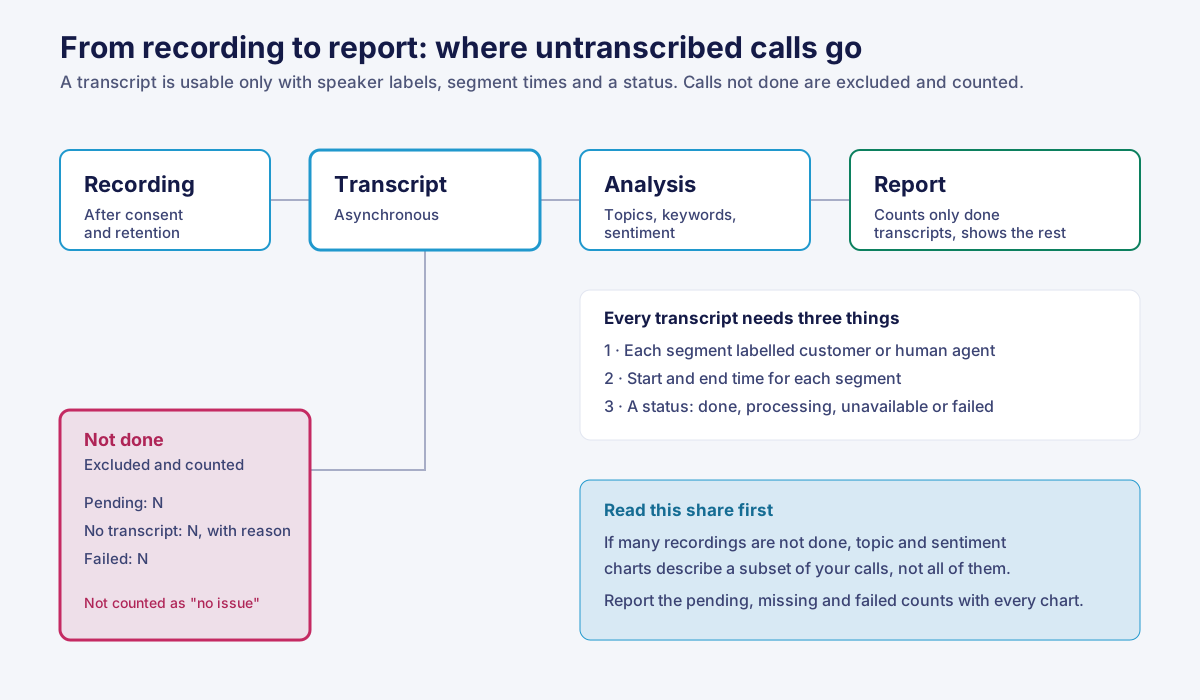
Speech analytics in a call center is search, classification, and counting run on transcripts. Its conclusions can only be as reliable as those transcripts. A usable transcript says who spoke, when each segment started and ended, and whether the recording was actually transcribed.
Call center call recording: consent and retention come first
No recording, no speech analytics. Before a call center call recording reaches a transcript, it has to clear consent and retention.
| Rule | What the text says |
|---|---|
| 18 U.S.C. § 2511(2)(d), federal | It isn’t unlawful to intercept a communication “where one of the parties to the communication has given prior consent to such interception” |
| California Penal Code § 632(a) | Applies to a person who, “without the consent of all parties to a confidential communication,” records it |
State rules differ. Compliance reviews should cover the states your callers are in, not only the state your center is in.
Retention decides how far back you can look. On our compliance page, call recordings are kept 90 days by default, and the setting runs anywhere between 30 days and 7 years. In HeroDash, once a recording is deleted under the retention period, its transcript shows as unavailable instead of returning blank. A blank transcript and a deleted one are different facts, and the data keeps them apart.
Call center transcription: what a usable transcript contains
A transcript is usable for analytics only if each segment is labelled customer or human agent, carries start and end times, and has a clear status. Miss any one of the three and the analysis can’t tell you what it claims to.
- Speaker labels. Without them, “the customer said cancel” and “the human agent read the cancellation policy” look the same to a keyword search.
- Start and end times per segment. Without them, you can’t measure silence, talk-over, or when the problem came up. Some mono and older recordings carry no timing, and a good system says so instead of guessing.
- A status for every recording. Transcription is asynchronous: some are still processing, some failed, some never had audio. A sentiment chart that treats untranscribed conversations as “no negative sentiment” reports coverage it doesn’t have.
HeroDash returns each call’s transcript as segments labelled customer or human agent, with start and end times. If the status says the transcript is done but the content comes back empty, HeroDash reports it as still processing rather than complete. That costs one more check, and it means an empty transcript never enters your analysis as a finished one.
Ask any call transcription software vendor how it marks each of these states, then decide how your reports count them:
| Transcript status | In the analysis | On the report |
|---|---|---|
| Done, with content | Counted | Normal |
| Still processing | Wait, then fetch again | ”Pending: N” |
| Unavailable: no recording, or deleted under retention | Excluded | ”No transcript: N,” with the reason |
| Failed | Excluded, then retried or flagged | ”Failed: N” |
The share in the last three rows is the first number to read on any speech analytics report. If it’s large, the topic and sentiment charts describe a subset.
AI call transcription accuracy is not one number
Transcription accuracy varies by speaker and language. A study published in 2020 tested five commercial speech recognition systems from Amazon, Apple, Google, IBM, and Microsoft on 19.8 hours of structured interviews with 42 white and 73 Black speakers in five US cities (PNAS, 2020).
Average word error rate was 0.35 for Black speakers and 0.19 for white speakers. Those engines have changed since. The lesson holds: one overall accuracy figure can hide large gaps between groups of callers.
So ask for word error figures measured on your own recordings, split by language and phone line. Multilingual centers need this most. A four-step test for any AI call transcription:
- Pull 50 recordings per language, across shifts and lines.
- Have a fluent person correct each transcript by hand.
- Count substituted, missing, and added words against the corrected version, per language.
- Repeat monthly, and again after any vendor model update.
Call center voice analytics and sentiment analysis in customer service
Sentiment analysis in customer service usually classifies the words in a transcript, so a transcription error becomes a sentiment error. Call center voice analytics reads the audio itself, such as pace, silence, and talk-over, and needs segment timestamps to do it.
| Sentiment analysis | Voice analytics | |
|---|---|---|
| Reads | Words in the transcript | Pace, silence, overlap in the audio |
| Depends on | Transcript accuracy and speaker labels | Segment start and end times |
| Goes wrong when | Words are misheard, or customer and human agent are mixed | Recordings carry no timing |
In the EU, the AI Act prohibits AI systems that infer emotions in the workplace, with medical and safety exceptions. Our guide to call center quality assurance software covers that line, plus the rubric scoring and coaching that use these signals.
Call center predictive analytics: what it can forecast and what it needs
The most common use of call center predictive analytics is forecasting volume by interval, which feeds workforce management. Any other prediction, such as which customers will call back, needs months of consistent history and a written definition of the outcome.
| Prediction | History it needs | Outcome definition to write down |
|---|---|---|
| Volume per 30-minute interval | Weeks of interval counts, with holidays and promotions marked | Offered, including abandons |
| Who will call back | Call records joined to customer IDs | Repeat contact within how many days, on the same issue |
| Which customers may leave | Contact history joined to account status | What counts as leaving, and by when |
Our Erlang calculator turns a volume forecast and a service level target into the number of human agents to schedule. For the other two, the definition comes first. A model trained on a vague outcome is precise about the wrong thing.
Call center analytics software: which kind of tool answers which question
Call center analytics software comes in three kinds: reporting built into a contact center platform, a standalone speech analytics product, and a business intelligence tool fed by exported data. The deciding question usually isn’t features. It’s whether you can export the records and transcripts behind every chart.
| Built into the contact center platform | Standalone speech analytics | Call center business intelligence | |
|---|---|---|---|
| Gives you | Queue, service level, and human agent reports; live dashboards | Topic, keyword, and sentiment analysis | Any join you can build, such as calls matched to orders in Shopify |
| Automation | Reports run on their own | Transcription and tagging run on their own | You build and maintain the pipeline |
| Self-service analytics | Fixed reports plus some custom cards | Saved searches and topic boards | Business users build their own once the data is modeled |
| Raw data export | Varies; ask | Varies; ask | It’s the whole point |
| Fits | Most teams, first | Teams with a question about what’s said | Teams with a data person and several sources to join |
Start with the first column. Before you choose more analytics tools for a call center, write down the question the first one can’t answer.
Where Callnovo.ai fits
HeroDash is Callnovo.ai’s support platform, used on its own or with a managed team. Callnovo.ai human agents work in 65+ languages for clients in 150+ countries through our multilingual support teams. HeroDash dashboards show queue depth, wait times, CSAT, and agent performance, and you can drill down from a chart to any conversation behind it.
HeroScore is the speech layer. On HeroScore, every call is transcribed, analyzed, and scored against your rubrics, and reports export as PDF or CSV. Plan prices for the platform are on our pricing page.
When you shouldn’t buy this from us
- Your phones will stay on another platform. A second platform’s dashboard only sees what runs through it. Feed your current system’s exports into a BI tool instead.
- The gap is the BI layer. If you need to join call records to orders or refunds, buy call center data analytics software, not a new phone system.
- You take a few hundred calls a month. A spreadsheet with written definitions answers most questions at that volume.
If an outsourcer runs your phones: what to put in the contract
When an outsourcer handles your calls, its reports use its definitions. Put the definition of every reported metric in the contract, then ask for access to the raw call records and transcripts, so you can recalculate any number you’re asked to pay against.
A service levels clause means nothing until the denominator sits in the same contract. For the commercial side, see outsourcing by minimum commitment and shared vs. dedicated agents.
- Attach a definitions table to the contract: numerator, denominator, and exclusions for each metric.
- State the reporting time zone and the hour a “day” closes.
- Get access to raw call records and to transcripts with speaker labels and segment times, not only the summary report.
- Ask how untranscribed recordings are marked, and how many there were last month.
- Agree on how long recordings are kept and how deletion is confirmed.
- Recalculate one week’s service level yourself before you approve the first invoice.
Before your next analytics review: three questions
- Can you write the denominator of your service level on one line? If you can’t, your targets rest on a number nobody has defined, and a second report can contradict it at any time.
- What share of last month’s recordings has no usable transcript? If nobody can answer, every topic and sentiment chart describes an unknown subset.
- Could you recalculate one number from your vendor’s report using raw records? If you can’t, you’re reviewing their arithmetic, not your operation.
None of this is hard; it just has to be written down. Callnovo.ai builds call center analytics into HeroDash, and those three questions apply wherever your calls run.
References
- Cornell Law School, Legal Information Institute, 18 U.S. Code § 2511: Interception and disclosure of wire, oral, or electronic communications prohibited, subsection (2)(d).
- California.Public.Law, California Penal Code section 632, subsection (a).
- Koenecke, A., et al., Racial disparities in automated speech recognition, Proceedings of the National Academy of Sciences, 2020.
- Call Centre Helper, Can AI Really Make Customers Happier?, November 2025.
- Regulation (EU) 2024/1689 (EU AI Act), Article 5(1)(f).