


本文目前仅提供英文版本。查看英文版 →
You wrote the rule: Portuguese speakers go to the Portuguese group. Then a Portuguese-speaking customer lands with a Spanish-speaking human agent anyway and gets transferred.
Call routing software answers two questions for every inbound call: who should take it, and can that person take it right now. A rule answers the first. Live status, channel settings, and capacity limits answer the second.
This guide covers what comes after: rule order, where a call goes when nobody’s free, and what should arrive when an AI phone agent hands off to a person.
On this page
- TL;DR
- The three parts
- The two questions
- When nobody is free
- Where the AI stops
- Containment and deflection
- Setups compared
- Checklist
- FAQ
TL;DR: call routing software in one table
Matching a call to a group is the easy half. The hard half is what happens when nobody there is free, and what the person who answers can see.
| The call | Signal the menu collects | Where the rule points | If nobody there is free | On screen at pickup |
|---|---|---|---|---|
| ”Where’s my package?” | Tracking number, keyed in | Tracking group | Hold, then a second tracking group | Parcel history and delivery estimate |
| Portuguese speaker, Spanish-speaking team | Language choice | Portuguese group | A bilingual group, never whoever is idle | Language and reason for calling |
| 2 a.m. local time | Business hours | A team on shift elsewhere, or a recording | A missed-call ticket | Who called and when |
| Upset customer | Menu choice, or what they told the AI phone agent | Complaints group | A senior group, never the menu again | What they already said |
What call routing software is made of: cloud IVR, ACD, and the call queue
Three parts do three jobs. The menu asks and listens, the automatic call distributor (ACD) picks a person, and the queue holds the call when nobody can be picked.
What IVR means, and what it doesn’t
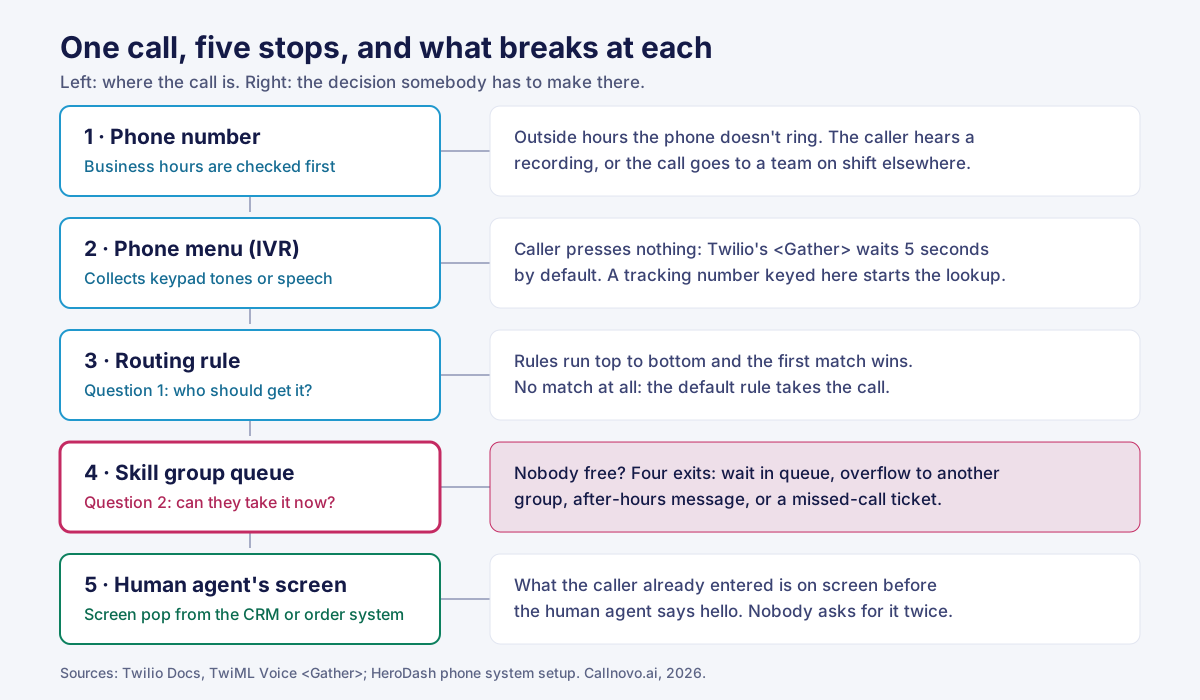
IVR stands for interactive voice response, and the meaning is literal. The phone system answers, plays a prompt, and responds to what the caller does next. An IVR is the phone menu that answers a call, collects input by keypad tones or speech, and passes it to the distributor, which picks the person.
Three things it isn’t:
- It isn’t an auto attendant. That only transfers to extensions. A menu can look something up mid-call and branch on the result.
- It isn’t the router. The menu collects and the distributor decides.
- It isn’t necessarily AI. “Press 1 for orders” counts. So does a system that understands a spoken sentence.
How the menu listens is a setting. In Twilio’s <Gather> verb, input can be keypad tones (DTMF), speech, or both, and the default is keypad only. The default wait is five seconds, and speech is captured for up to 60 seconds (Twilio Docs, 2026). If the caller enters nothing, the flow continues, and in Twilio’s simplest example nothing comes next, so the call ends. “The caller did nothing” is a branch too. If you didn’t configure it, the platform’s default did.
Cloud menus versus the attendant on your desk phones
A cloud IVR is hosted with the rest of the contact center system, so it can query other systems mid-call. For an online store, that’s the order in Shopify or the ERP.
In our Latin America logistics case, callers key in a tracking number and HeroDash pulls the parcel’s route, status history, and delivery estimate from the client’s systems. It’s on the workbench when a human agent picks up.
The distributor and the queue
ACD software does the assigning. On HeroDash’s phone system, an inbound call enters a queue and the caller’s keypress points it at a skill group, such as pre-purchase or after-sales.
A human agent has to be added to a skill group to receive its calls. A new hire who isn’t in it won’t get them, whatever the rule says.
Intelligent call routing answers two questions. Most guides stop at the first
The two pages in our sample that say “intelligent routing” most often both describe it as AI working out what the caller wants. That’s one input. The engine that assigns the work runs on rules, live status, and capacity. In HeroDash, “intelligent” doesn’t mean an AI is deciding.
Microsoft splits it the same way: “Unified routing has two main stages: classification and assignment.” Classification adds information to the work item. Assignment gives it to a person based on skills, availability, and workload (Microsoft Learn, 2026).
A note on scope: the mechanics below are how HeroDash’s assignment engine handles tickets, chats, messages, and callbacks on missed calls. Phone systems name these pieces their own way, so look each one up in yours.
Question one: who should get this call
A rule is a set of conditions and a destination. In HeroDash the conditions can be the channel or number, brand, business hours, country, tags, and custom fields. They sit in two groups, “all of these” and “any of these,” and the rule matches when either group is satisfied.
Rules run top to bottom. The first match executes and nothing below it is read. If none match, the default rule takes the work. So rule order is configuration. Twilio’s TaskRouter documentation says the same: “If a Task matches multiple filters, only the first matching filter is evaluated.” It adds: “Like switch statements, you should always include a default_filter” (Twilio Docs, 2026).
Here’s the mistake in a few lines you can run:
RULES = [  # evaluated top to bottom; the first match wins
    ("Any call in business hours", lambda c: c["open"], "general_queue"),
    ("Portuguese tracking", lambda c: c["lang"] == "pt" and c["intent"] == "tracking", "pt_tracking"),
]
DEFAULT = "after_hours_team"  # where a call goes when no rule matches

def route(call):
    for name, matches, group in RULES:
        if matches(call):
            return group
    return DEFAULT

print(route({"open": True, "lang": "pt", "intent": "tracking"}))    # general_queue
print(route({"open": False, "lang": "es", "intent": "complaint"}))  # after_hours_team
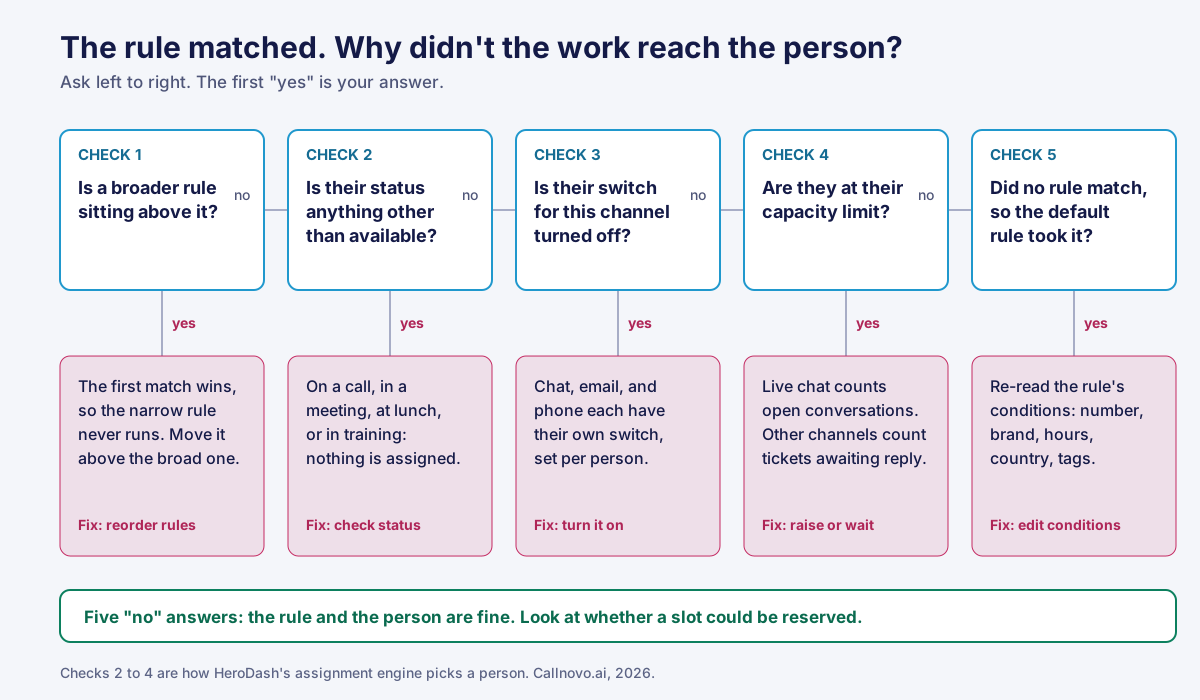
The Portuguese rule is correct and never runs in business hours, because the broad rule above it matches first.
Question two: can that person take it right now
A matched rule names a person or a group. HeroDash’s assignment engine then runs four checks:
- Status. The person has to be in an available state. On a call, in a meeting, at lunch, in training: skipped.
- Channel switch. Each person has their own switches: one for chat channels, one for email, one for phone.
- Capacity limit. Live chat counts open conversations. Slower channels count tickets awaiting a reply.
- A slot. Two requests arriving together can’t take the same slot, and a slot is released if a later step fails.
Work through this list when a correct rule didn’t reach someone. Start one step earlier, with rule order.
Skills-based routing and how a group picks one person
Skills based routing, usually hyphenated, sends work to a group defined by what its members can do: a language, a product line, a type of request. In Amazon Connect, queues are tied to human agents through a routing profile, which sets each queue’s priority and delay (AWS Docs, 2026).
Inside a group, HeroDash offers five strategies:
| Strategy | How it picks | Limit |
|---|---|---|
| Random | Any eligible member | No control over the spread |
| Round robin | Each member in turn | Ignores who’s better at what |
| Priority | Lowest number first; the next tier gets work when the first is full | Backup sits idle until then |
| Weighted | By proportions you set | Individuals only, not skill groups |
| Manual claim | People pick up work themselves | Nothing moves until someone claims it |
Sticky assignment is on by default: the engine first tries whoever handled this contact last time, then falls back to the strategy if that person is offline or at capacity.
The logistics team shows it working. Spanish and Portuguese calls used to land in one pool, and a Spanish-speaking human agent who picked up a Portuguese speaker could only transfer. The new menu collects reason and language, then feeds Spanish tracking, Portuguese tracking, and complaints groups: 40 people, 2,500+ inbound calls a day.
When nobody can take the call: what call queue software has to decide
When a rule matches but nobody in the group is free, the call has four exits: hold in queue, overflow to another group, hear an after-hours message, or become a missed call.
| Exit | What the caller hears | Decide in advance |
|---|---|---|
| Hold in queue | Music, ideally a position or an estimate | The longest hold before the next exit |
| Overflow | Usually nothing; the call moves | Which group, and whether it can finish the work |
| After-hours message | A recording | Hours on the number; who covers the night |
| Missed call | Ringing, then nothing | Where the callback ticket is assigned |
Overflow deserves the most thought. A group that can’t finish the call turns one hold into two.
In HeroDash, business hours are set in the rule. Outside them the phone doesn’t ring; the customer hears the after-hours prompt. That’s a per-number setting, so night coverage is a staffing choice. A medical device manufacturer selling in more than 120 countries passes calls from one team’s shift to a team in another time zone, on the same local number. A missed call creates a ticket, and that ticket goes through assignment like any other.
Holds continue after pickup. After more than 10 seconds on mute or hold, the workbench warns: “The customer has been on hold beyond the configured limit.”
Timeouts are where exits get lost. If a target times out with no next target or filter, Twilio says, “the Task will fall out of the Workflow and be canceled.” The default filter doesn’t catch it (Twilio Docs, 2026).
AI IVR and conversational IVR: where the AI stops and a person takes over
The front door can be a keypad menu, a conversational menu, or an AI phone agent. Each should pass the call to a person at a defined point, with what the caller already said attached.
| Front door | Understands | When it can’t finish |
|---|---|---|
| Keypad menu | Digits | Passes the call to a group |
| Conversational menu, or smart IVR | A spoken sentence | Falls back to the keypad or a person |
| AI phone agent | A multi-turn conversation, with order lookups | Hands the call to a human agent |
Automation fits calls with a looked-up answer, such as where a package is. That’s IVR self-service, whether the caller presses keys or talks.
One cross-border car parts seller runs this way. HeroDash AI Voice answers first in English or Spanish and checks order status in the seller’s ERP. One human agent covers 8:00 to 17:00 PT and takes complex after-sales problems, emotionally charged complaints, and exceptions with no standard process.
When to hand off
Write the triggers down before launch. Our list for a product-recall hotline has five:
- The caller is upset.
- The caller reports possible injury or property damage.
- The caller’s details can’t be verified.
- A region-specific policy applies.
- The caller has called before about the same unresolved issue.
None of these asks the AI to judge the claim. They tell it to stop.
What should arrive with the call
Whatever the customer already keyed in or said shouldn’t be asked again.
| Should arrive | Comes from | If it’s missing, the human agent asks |
|---|---|---|
| Who’s calling | Their number matched to a contact in the CRM | ”Can I get your name and email?” |
| Order, tracking, or serial number | Keyed or spoken in the menu | ”What’s your order number?” |
| What they chose or said | The menu path, or the AI conversation | ”How can I help you today?” |
In HeroDash, screen pop is part of the phone feature set. Its AI agents can pass a conversation to a human agent at any point, with the conversation carried over so the customer doesn’t repeat it.
One setup step gets skipped. After you build the knowledge base, write the prompt, and set the greeting, the AI phone agent still has to be bound to a phone number. Until then nothing answers.
Billing follows the handoff. Keypad menus aren’t billed as AI usage. AI minutes before a handoff count; after it, the bot charge stops and only carrier charges continue. Our guide to AI-led escalation handling compares how vendors bill that moment.
IVR containment rate and call deflection: useful numbers, wrong targets
IVR containment rate is the share of calls that end inside the menu without reaching a person. It counts a caller who finished a task and one who gave up as the same result. Chase it and the menu that traps people scores best.
Call deflection has the same flaw. It’s good when the job gets done in the other channel. The logistics team texts a link to people who only want to change a delivery time, and no person is tied up.
Containment can climb while customer satisfaction falls, so pair each number with the one that exposes it.
| Number people target | What it can’t see | Read it next to |
|---|---|---|
| Containment rate | Whether the caller finished or quit | Menu abandonment; repeat calls within 7 days |
| Deflection rate | Whether the task got done in the other channel | Callbacks from deflected callers |
You can check your own number. From last week’s calls, count C, calls that ended in the menu; A, the ones where the caller hung up before completing anything; and R, the ones who called again within 7 days. Honest containment is (C − A − R) ÷ total calls. If that’s under half your reported figure, the menu is ending calls without solving them.
The medical device manufacturer measured time in the menu. Its support line replaced a menu tree with three steps: say what you need, enter the device serial number, get matched on device type, language, and urgency. After one year, time in the menu fell from 3 minutes to 30 seconds and first-contact resolution rose from 58% to 87% (case study).
Expect the calls that reach people to get harder. SQM Group, which sells first call resolution (FCR) benchmarking, puts the industry average at 71% from post-call surveys, with no sample size given (SQM Group, 2026). It notes that as simple issues move to self-service, the remaining calls are more complex.
IVR software and routing setups compared, and where Callnovo.ai fits
The solutions on the market fall into four setups.
| Auto attendant on a business phone system | Cloud menu plus ACD in a support platform | AI phone agent in front, human agents behind | Outsourced human agents on the same platform | |
|---|---|---|---|---|
| Signals | Digits, time of day | Digits, speech, caller’s number, order lookups | All of that, plus the conversation | Same as the platform |
| Nobody free | Voicemail | Queue, overflow, recording, callback ticket | AI answers at any hour; handoffs need staffed hours | A shift in another time zone |
| Priced by | Line or user | Seat, plus carrier charges | AI minute, plus seats and carrier charges | Staffed seat or resolved contact |
Where Callnovo.ai fits
Two gaps show up when a team runs the first three alone. One time zone means a recording at night. A “route by language” rule needs a group that speaks the language.
HeroDash covers the platform side. Its plan terms say: “Phone features are not split by plan: any plan that carries voice gets the phone feature set in full.” That includes multi-level menus, screen pop, and call recording. For text tickets, see our ticket triage guide.
Our pricing page lists the Voice Pro plan at US$40 per agent per month on an annual contract, or US$48 billed monthly, with multi-level voice menus included. If you also staff with Callnovo human agents, the platform bills monthly at the annual rate. The AI Receptionist is US$0.15 per minute, with a US$200 monthly minimum. Rates for human agents are on the same page.

Callnovo.ai human agents work in 65+ languages and take calls on the same platform, so the language rule has someone at the other end. Our multilingual support teams also staff the night shift; see the guide to multilingual call center services.
IVR for small business doesn’t need all of this. Start with a two-layer keypad menu and one explicit exit for when nobody’s free.
When you shouldn’t buy this from us
- You get a handful of calls a day. A menu adds a step and saves nobody time.
- You distribute sales leads. Lead scoring and pay-per-call attribution are a separate product category. We don’t build for it.
- You want to self-serve tonight. Numbers, extensions, and skill groups in HeroDash are set up with our support team.
IVR best practices: an 11-point checklist and three test calls
Menu
- Order options by what callers want to do, not by department.
- Keep it to two layers.
- Before Black Friday, move the most-asked request to the first layer.
- Configure the no-input branch. Twilio’s
<Gather>waits five seconds by default.
Rules
- Give every rule set a default rule, and check where it points.
- Never put a broad rule above a narrow one.
Nobody free
- Write down each skill group’s exit: overflow group, recording, or callback ticket.
Handoff
- Confirm the AI phone agent is bound to the number.
- Write the handoff triggers as a list and test each one.
- Call every path yourself before launch.
- Place the call-recording notice where your local law requires it.
Then call your own number three times.
- What happens when you press nothing? If the call drops or loops, the no-input branch is running on a platform default nobody chose.
- What happens when the matched group has no free person? If you hold with no estimate and no way out, the group has a queue and no exit.
- Key in an order number, then have a colleague transfer the call to you. What’s on your screen? If it’s blank, your customers are giving that number twice.
Routing isn’t hard. It’s specific. Callnovo.ai runs it on HeroDash with human agents behind the rules, but those three calls work on any platform.
References
- Twilio Docs, TaskRouter: Workflow Configuration, 2026.
- Twilio Docs, TwiML Voice: Gather, 2026.
- Microsoft Learn, Overview of unified routing, 2026.
- AWS Docs, How routing profiles work, 2026.
- SQM Group, FCR Metric Operating Philosophy, 2026.