

We wondered whether Claude could handle the first layer of candidate screening. The results were surprisingly encouraging.
Key Takeaways
- We used Claude Desktop’s scheduled task automation (via the Cowork feature) to automate candidate screening and interview scheduling on a major recruiting platform — it browses, evaluates profiles, and books Zoom calls on our Google Calendar without human intervention.
- The setup took one day; fine-tuning the prompt took four — the hardest part wasn’t the technology, it was handling edge cases like candidates with no availability, duplicate profiles, and time zone mismatches.
- Sonnet 4.6 is the sweet spot for this workflow — Haiku couldn’t handle the decision-making, Opus is overkill for the cost. Sonnet on a Claude Max subscription is the right balance.
- It scheduled 20 Zoom interviews in its first week — my calendar fills up automatically now, and I just show up to the calls.
Last Monday I opened my Google Calendar and found eight Zoom interviews neatly scheduled across Tuesday and Wednesday alone — part of 20 it would book that week — candidates I’d never manually reviewed, on a recruiting platform I hadn’t logged into since Friday. Claude did it over the weekend.
This is the story of how we partially replaced our recruiting workflow with an AI agent that browses the web, reads candidate profiles, and books interviews. We’re careful about where and how we use these workflows. The broader point isn’t to evade platform rules — it’s that AI agents are quickly becoming capable of handling repetitive recruiting tasks that many teams still do manually. Platforms, vendors, and employers will all need clearer policies for that future.
The Exact Setup
Here’s what we deployed. Nothing exotic — this runs on a standard Windows workstation.
Install Claude Desktop
Download and install Claude Desktop on Windows. This is the Anthropic desktop app that can run scheduled tasks and interact with your computer.Install Chrome + Claude Extension
Set up Chrome as the browser. Install the Claude browser extension, which lets Claude Desktop see and control what’s on screen — navigating pages, clicking buttons, scrolling, filling forms.Connect Google Calendar
Configure Claude Desktop’s Google Calendar integration via MCP. This gives Claude the ability to check existing calendar slots and create new Zoom meeting events directly.Create Scheduled Task
Set up a recurring task in Claude Desktop with a carefully crafted prompt that defines exactly what to do: which platform to visit, what criteria to filter by, how to evaluate candidates, and which time slots to offer for interviews.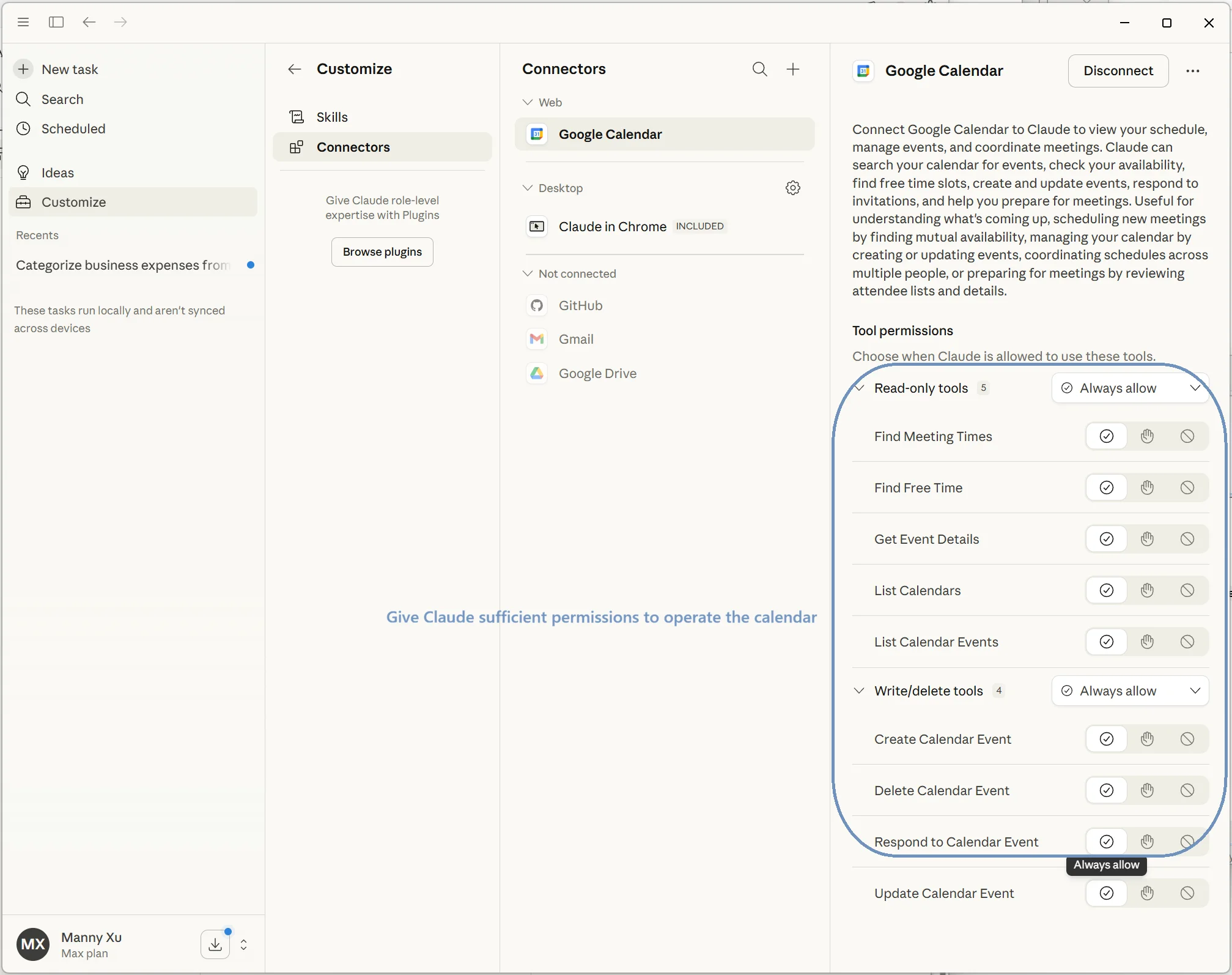
Connecting Claude Desktop to Google Calendar via MCP — granting permissions to find free time, create events, and manage meeting scheduling.
The scheduled task runs every two hours during business hours. Claude Desktop only offers hourly or daily scheduling — no custom intervals. So here’s the prompt trick: we instruct the task to only execute during odd-numbered hours. The task fires every hour, but the prompt’s first instruction is to check the current time and exit immediately if it’s an even hour. Simple, effective.
Four Days of Prompt Engineering
The technology setup took a few hours. The prompt engineering took four days.
The core prompt tells Claude to log into the recruiting platform, navigate to the candidate search, apply our filters (role, experience, location, availability), and review each candidate’s profile. For candidates that match our criteria, it opens a messaging thread, proposes available interview slots from our Google Calendar, and creates a Zoom meeting.
We’ve open-sourced the full prompt on GitHub: claude-cowork-recruiter-prompt
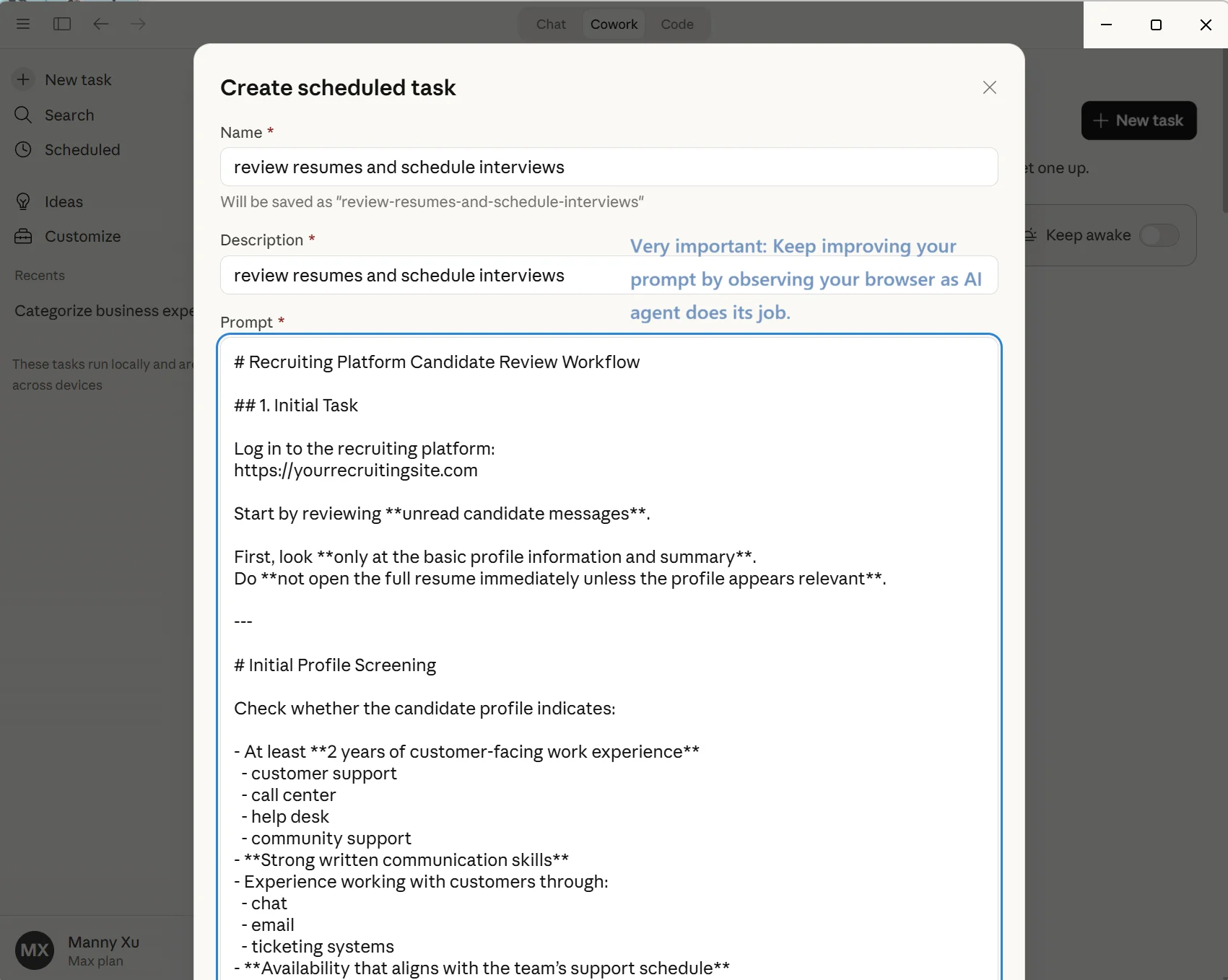
Creating a scheduled task in Claude Desktop with the full recruiting prompt — this runs every hour, screening candidates and booking interviews automatically.
That’s the happy path. The edge cases are where we spent four days:
Candidates with no listed availability. The prompt needs to handle this gracefully — send a message asking for availability rather than trying to force-book a slot.
Duplicate outreach. Claude needs to check whether we’ve already contacted a candidate before messaging them again. We encode this as a calendar check: if a Zoom meeting with that candidate’s name already exists, skip them.
Time zone mismatches. Candidates in different time zones need offers adjusted to their local time. The prompt includes time zone logic.
Platform UI quirks. Buttons that load dynamically, modals that overlay the page, infinite scroll that needs multiple scroll-and-wait cycles. Each of these needed specific handling instructions in the prompt.
We monitored every run closely for the first four days, watching Claude’s screen in real-time, catching mistakes, and refining the prompt. By day five, it was running unsupervised.
How Claude Actually Operates the Browser
This is the part that surprised me most.
Claude Desktop instructs the Chrome extension to perform actions: navigate to a URL, scroll down, click a specific button, fill in a text field, submit a form. After each action, the extension sends a screenshot back to Claude, which analyzes the visual state and decides what to do next.
It’s remarkably competent. Most of the time, it clicks exactly the right buttons, reads profile information accurately, and navigates multi-step workflows without issues.
But it’s not perfect:
Missed clicks. Sometimes Claude targets a button but misses — maybe the page hasn’t fully loaded, or an overlay is partially blocking the element. When this happens, it recognizes the failure from the next screenshot and retries. Usually it gets it on the second or third attempt.
Creative JS injection. This is the fascinating part. When Claude can’t achieve a certain action through normal clicking — maybe a dropdown menu won’t open, or a button is hidden behind another element — it directs the Chrome extension to inject JavaScript into the browser to accomplish the task. It’ll run something like document.querySelector('.apply-btn').click() to force-click an element it can’t reach visually. I didn’t instruct it to do this. It figured it out on its own when the normal approach failed.
I’ll be honest: I don’t love the idea of an AI directing arbitrary JavaScript injections into web pages via a Chrome extension. But I’ve watched it happen dozens of times now, and it’s always targeted, always to accomplish the specific task at hand, and it works. So I let it be.
I opened my calendar Monday morning and found eight interviews already scheduled for the week. Candidates screened, time slots matched, Zoom links generated. I just had to show up.
Manny Xu, CTO, Callnovo
Model Selection: Why Sonnet 4.6
We tested three models:
Haiku — Not good enough. It struggles with the multi-step reasoning required to navigate complex web UIs. It would get confused by dynamic page elements, miss important profile details during evaluation, and make poor scheduling decisions. Not viable for this workflow.
Opus — Works great, but probably overkill. The decision-making quality wasn’t noticeably better than Sonnet for this specific task, and the cost difference on a Claude Max subscription is significant if you’re running tasks every two hours.
Sonnet 4.6 — The sweet spot. It handles the browsing, reasoning, and scheduling reliably. It recovers from errors intelligently. It’s fast enough to process multiple candidates per session. And on Claude Max, the economics work.
We run everything on a Claude Max subscription. For a workflow that replaces hours of manual recruiting work per day, the subscription cost is trivial.
What Broke (And What We Accept)
Two recurring issues, both tolerable:
1. Extension login prompts. Claude Desktop frequently prompts for the Chrome extension to re-authenticate — sometimes mid-task, for no apparent reason. When this happens, the task stalls until someone manually clicks through the login. It’s annoying, not fatal. We’ve learned to keep the workstation accessible during work hours.
2. Occasional crashes. Claude Desktop has crashed a handful of times, preventing scheduled tasks from running. A reinstall has fixed it every time. Not ideal, but this is early-stage software. We’re confident Anthropic will iron these out.
Neither of these is a dealbreaker. We’re running a workflow that would otherwise require a dedicated recruiter spending 3–4 hours per day on repetitive screening and scheduling. An occasional missed task is a rounding error compared to that.
The Result
My calendar fills itself with Zoom interviews now.
Every few hours, Claude logs into the recruiting platform, reviews new candidates against our criteria, messages qualified ones, and schedules interviews into open slots on my Google Calendar — complete with Zoom links. When I sit down in the morning, my day is already planned.
In its first week, it scheduled 20 interviews. Not all of them were perfect matches — the prompt still needs refinement on a few criteria edge cases — but the hit rate was high enough that the time savings are massive.
We’re now rapidly deploying this same approach across both our technical hiring and CSR recruiting pipelines. It’s still experimental — we’re tuning prompts, catching edge cases, and learning what works for different role types. But the direction is unmistakable. When a desktop app and a well-crafted prompt can do in two hours what used to take a recruiter an entire day, you can see where this is heading.
And that’s the real point. This isn’t just about recruiting. Every role in every company — technical or not — is about to be reshaped by AI tooling like this. The people who learn to work alongside these systems now will have an enormous advantage. The ones who wait for permission, or assume AI is only for engineers, are going to be caught off guard.
This is what AI deployment actually looks like in 2026. Not grand visions of AGI replacing entire departments. Just a desktop app, a Chrome extension, a well-tuned prompt, and four days of patience. The kind of thing any company can set up if they’re willing to experiment.
We’ll keep refining the prompt, and we expect the tooling to get significantly more stable in the coming months. The time you spend on manual screening today is time you won’t get back once this tooling matures.